Showing posts with label cycling. Show all posts

Thursday, 23 February 2017

Podcast Interview with Gábor Szárnyas, Budapest University of Technology and Economics

Waw. That was probably the longest stretch that I went without publishing blogposts or podcasts over here. I have no real excuse - the start of 2017 has just been super busy and interesting - with a lot of travel that does not really help with quiet "writing" time. But it's all great fun - I just need to get back into the rhythm - and today is the start of that.

Today's podcast is actually super cool. It started at a beautiful Brussels bar after Fosdem. At this conference, there have been "graph devrooms" hosted for the past couple of years - and this year it was a really nice lineup.  One of the speakers, Gábor, did this really interesting talk about "Graph Incremental Queries with OpenCypher", which is really cool. So after the conference, it turned out we share a passion for cycling too - and we decided to get together for a nice recording. Here it is:


Here's the transcript of our conversation:
RVB: 00:04.202 Hello everyone. My name is Rik, Rik Van Bruggen from Neo Technology and I must confess I feel very, very guilty now because this is the first time that I'll be recording a podcast in 2017, so happy new year. In spite of the fact that it's Valentine's Day. But yeah, I was slacking a little bit but I want to bring the podcast back to life and I've lined up a bunch of people to help me with that. And today I've invited someone who I've who only met like two weeks ago at the FOSDEM Conference in Brussels. And that's Gábor Szárnyas from Budapest. Hi Gábor. 
GS: 00:42.680 Hi Rik. Nice to be here. 
RVB: 00:43.500 Hey. Thank you for joining me. It was a great time meeting you in Brussels over some Brussels beer, but yeah we talked to each other about your work and I thought it would be great to have you on the podcast. So my first question is going to be who are you, and what do you do? What's your relationship to the wonderful world of graphs? 
GS: 01:10.158 Okay. So I'm a researcher at Budapest University of Technology and Economics. And also visiting researcher at McGill University in Canada. Now I'm working on finalizing my PhD, so hopefully I will be finish it within a year or a half. And I worked basically on graph- related topics in my PhD. 
RVB: 01:33.134 Oh, very cool. And don't forget you share another passion with me. 
GS: 01:38.380 Yeah, I'm also a cyclist. 
RVB: 01:40.152 Yes, exactly. 
GS: 01:40.729 So I started road cycling three years ago and it absolutely wondered me. I really like cycling-- 
RVB: 01:49.279 Same for me...
GS: 01:50.351 --and that's my main passion. 
RVB: 01:51.948 Same for me. We have a couple of other graphistas that are super passionate about cycling so we'll have to do a ride sometime. But tell us-- 
GS: 01:59.412 I agree. 
RVB: 01:59.558 --a little bit more about your work with graphs. What's it all about, what's your PhD about, and what are you working on? 
GS: 02:07.503 Okay. So my PhD revolves around three topics that are related to graphs. The first one is how to incrementally query graphs. So imagine that you have a complex query and you have a huge graph. Now obviously, it's very difficult to evaluate a query on the graph at a very short amount of time. So basically, as a workaround, we do incremental queries, which means that if your graph changes slightly then we maintain the result sets. And this is useful for a number of scenarios. You can use it for static analysis of code bases, you can use it for runtime modelling, you can use it for fraud detection, and so on. There are many use cases that present this scenario. 
GS: 02:52.025 The second topic of my PhD is how to benchmark an incremental graph query engine. Because, obviously, once you have an incremental graph query engine, you would like to have some feedback on its performance. And you would like to use that to continuously improve your query engine. So, with my research group, we designed and implemented a framework that allows users to do just that. Compare incremental graph query solutions to each other and to other competitors. 
GS: 03:22.765 And the third one-- yes? 
RVB: 03:22.870 Is that related to the LDBC work, the Linked Data Benchmarking Council, is that related to that? 
GS: 03:30.529 So basically they have similar goals. I was actually at Walldorf last week at LDBC Technical User Community Meeting. And LDBC has a couple of benchmarks, but currently none of those covers incremental graph queries and complex graph pattern matching. I talked to the LDBC guys and also attended the talks, and it seemed that there will be a new LDBC benchmark, which will have similar goal than my benchmark. And that will be called the Business Intelligence workload for the Social Network Benchmark. And the problem with that is that it's not yet ready. So I talked to it's core developer, Alex Averbuch, and he said that it will be ready within half a year but they are still heavily working on it. 
RVB: 04:29.082 Okay. But you had said that you had three goals, right? You had the incremental queries and then the benchmarking and what was the third one? 
GS: 04:34.976 The third one is closely related to network theories. A network theory is something that came up in the late '90s in the early nodes when people started to analyze graphs. So they took a graph of people where the nodes were the people in a community and the relationships were if they were friends or not. Or they took the graph of the World Wide Web where the nodes were the web pages and the relationships were the links between the web pages. So they took all these graphs and started to analyze them, and they derived very interesting properties, chief among which was the scale-free property of graphs. There are many papers on scale-free networks, and they discovered that this is very common in biology, in sociology, also in physics and other sciences. 
RVB: 05:28.488 What does that mean, scale-free networks? What does that mean?
GS: 05:30.744 So basically scale-free network means that the degree of distribution of the nodes follow the so-called power law. So you have very few central hubs. And basically, if you remove these hubs from the network then your network will break down to smaller components. And they discovered that this is how societies are organized, this is how citation networks work, and this is how power grids work as well. 
RVB: 06:00.783 Oh wow. Just like a universal structural characteristic of lots of networks. 
GS: 06:06.958 Yes, lots of networks. Obviously you cannot apply to all of the networks but it was a very big surprise to the scientists who worked on it that a lot of networks exhibited this property. So how does my PhD research relate to that? Well interestingly, there wasn't much work performed on tide graphs. So if you see Neo4j graphs, you obviously see that you don't only have people and websites and books, but you have all these inner single graphs. So you have tide graph, and they also have different relationships between them. And only in the last five to ten years have been there research about how to characterise these graphs. These have many interesting names. Some people call them the multiplex networks, others call them the multidimensional networks or multilayered networks. Analysing these is very tricky because obviously you have another dimension of complexity by having to deal with all the types of the nodes and the relationships in the graphs, but it's kind of a green area and you can do a lot of interesting work in it. I actually applied it to engineering models, so my research group works in model driven engineering. And there are engineering models for software, hardware, state machines, system design and so on. And basically we took all these models and analyzed them and we looked for some interesting properties. 
RVB: 07:58.123 Wow. 
GS: 07:59.168 We didn't find any huge results so we didn't find that these models are scale-free or they follow some very famous distribution. But we did have some interesting results on how to characterize these models. 
RVB: 08:18.190 Wow, very cool. So could you tell us a little bit more about how you got into the graph business, or the graph science if I may call it that way? How did you get into it, and why did you get into? 
GS: 08:35.661 Okay. Well, that's an interesting question. I think it started in 2011 when I had to pick my first individual research topic at my university, and my roommate
suggested that I should give a try to node secure databases. I was already very interested in anything that's related to databases, relational or not. So I started to work on node secure databases. And then I soon discovered Neo4j and the property graph data model. And I think what really struck me is how intuitive the graph data model is. There is actually a paper by Marko Rodriguez, who was the implementer of the TinkerPop framework, and he said that graphs are very intuitive because they describe the way that people use when thinking about the world. So people tend to abstract the world as things that are somehow connected. And you can perfectly describe this with graph nodes and graph relationships. So this is something I really like about graphs. And that's something that you also mentioned in this podcast, I think a couple of times, that you can use a whiteboard and then just start brainstorming, and having ideas, and drawing a graph. And you can use pretty much the same graph in your applications as well. So that's my favourite thing. 
RVB: 10:07.046 Jokingly, I always talk about my own acronym, which is WYDIWYS, what you draw is what you store. 
GS: 10:14.439 Yeah, that's a catchy acronym actually. 
RVB: 10:18.913 It's been repeated so many times on this podcast but it is a very big strength of graphs, right? The model is so intuitive and so descriptive, so rich, really. That makes a whole lot of difference, right? So I'm reading that that's also how you got into it, right? That's also why you think it's very valuable? Is that right? 
GS: 10:43.860 Yes. So basically after I got a bit familiar with the topic, I started my master's at university. And already during my master's I was working on the incremental query engine that I'm still working on today. So it's quite a long project. I've been doing this for five-plus years. And I really liked my experience during the master's so I joined the PhD and I just finished PhD school three weeks ago. So now it's only-- 
RVB: 11:11.500 Congratulations [laughter]. 
GS: 11:13.087 Thank you. So it's only up to me to publish some more papers and polish a dissertation. 
RVB: 11:21.283 So what does the future hold, Gabor? Where is it going for you personally? Where is your research taking you, but also how do you look at this taking ground in the broader industry? What's the future hold if you had a crystal ball? 
GS: 11:36.571 So, I would really like to be an academic. I really enjoy working at university because you have so many positive experiences with students. You can pretty much follow your own dreams and do research in almost whatever interests you the most. Obviously you have to fit within your grant proposals and your funding but this still gives you a lot of way to be creative and I would like to be a university lecturer and researcher in the future. So that's my kind of dream career. And-- yes? 
RVB: 12:17.317 And is it lecturing and teaching about graphs then or is it on a broader topic or is it computer science or what will be the topic then? Or topics? 
GS: 12:26.893 Well, I'm pretty much happy to teach anything relates to computer science, so I've taught topics from database theory to automata theory, system modelling, and software engineering topics, and also some laboratories on actual technologies. So our university is a bit of a mix between computer science and computer engineering. So we teach both theoretical and practical stuff and this is something that I also really enjoy. 
RVB: 13:01.647 Super. And what about the wonderful world of graphs and graph databases, is there anything like that in your future you think? 
GS: 13:10.251 Yes. So I really would like to get a version of my graph query engine that can be used by other researchers. I obviously understand that implementing production-grade software is not really possible within the limits of a PhD. But I would like to release a system that can be used at least by other researchers, both in academia and both in industry. I talked to a lot of people about this and it seemed that people would actually be interested in trying such a system, or benchmarking such system, and see how it works for their use cases. 
RVB: 13:49.818 Super. So final question, what's your favourite cycling destination? 
GS: 13:54.706 Ooh, that's a tricky question [laughter]. 
RVB: 13:56.737 Curveball for you. 
GS: 13:56.958 But actually, it's not a very common answer. I live next to the Hungarian-Austrian border, so I do go a lot to Austria because Austria has the best roads in Europe, and also most of the country is the Alps. So I live next to the lower Alps section, but even there you have very nice hills, and drivers are really polite, and you have these super flat tarmac all over the country. And that's what I really enjoy and I'm really looking forward to the summer. So I just usually disappear from the university for a couple of weeks and then go home and cycle. 
RVB: 14:38.375 Excellent. So no cobblestones for you? Unlike Flanders Classics or something like that? 
GS: 14:44.387 I actually really like riding the [inaudible], so I live in the inner historical district of Budapest and we still have a lot of cobblestone roads. And when I just started cycling in Budapest just to get to work and commute I usually tended to avoid those sections. But since I'm more into cycling I just go for the most cobblestoney sections [laughter]. This is something that you learn to enjoy or at least you think you enjoy it. 
RVB: 15:16.963 Yeah, yeah. Exactly. Very, very cool. All right. Well, I hope we get to ride one day together, that would be great. I really enjoyed this conversation. Thank you for taking the time. And I look forward to meeting you again someday, at FOSDEM or somewhere else. 
GS: 15:32.360 Thank you, for an invitation and we should definitely go for a ride. 
RVB: 15:36.138 Absolutely. Thank you, Gábor. 
GS: 15:38.717 Thanks. Bye

Subscribing to the podcast is easy: just add the rss feed or add us in iTunes! Hope you'll enjoy it!

All the best

Rik

Wednesday, 20 July 2016

Graphing the Tour de France - part 3/3

In the past two blogposts I have been creating and importing some nice Tour de France 2016 data. It's a small dataset, for sure, and this is by no means a realistic graph application - but perhaps we can still have some fun exploiting the data with some cypher queries. That's what we'll try now. I have put all of the example queries together in this gist, so please feel free to play around with it :) ... let's take you through it.

Is the model really there?

First and foremost, let's verify the model that we wanted to put in place, with yet another AAPOC (Awesome APOC). We thought we were going to get this model:

Monday, 18 July 2016

Graphing the Tour de France - part 2/3

In a previous blog post, I created a couple of Google spreadsheets with some of the results data of the 2016 Tour de France. These spreadsheets can be very easily downloaded as two comma-separated files that hold the data:
I will be updating the stages.csv files as the Tour progresses, so we can keep updating the graph as well.

Creating a model

To import these CSV files into Neo4j, I actually went through multiple iterations of the model. Here's two of them that I wanted to share with you - not because of the fact that one of them would be "right" and the other one would be "wrong", but because it really reflects the fact that your use case - the questions that you want to ask of your data and what you want to be doing with the data - is going to determine the model. Underlined. In Bold. Because it's so important.

Thursday, 14 July 2016

Graphing the Tour de France - part 1/3

Alright, it's time to come out of the closet. I have to admit, over the past couple of years, I have turned into a bit of a cycling geek. I love watching the races in Flanders in spring, the legendary "ride through hell" from Paris to Roubaix, and of course, now, in summertime, the big tours of Italy, France and Spain. I have grown quite addicted to it - and have taken to riding my own bike a couple of times a week as well... it's a ton of fun. Last year I did a fun experiment in a series of 5 blog posts about the Professional Cycling twitterverse, but this year, I had something else thrown into my lap. Here's what happened.

Sunday, 24 May 2015

Cycling Tweets Part 5: querying the CycleTweets

After parts 1 to 4 of this series where we have mostly been loading and tweaking data for the Cycling Tweets, now it's time to have some fun querying this dataset with Cypher.

All of the queries are on Github, but let me just walk you through a couple more interesting ones.

Warming up the "Cypher Muscles"

Let's start with something easy, just to get the "Cypher Muscles" going:
//degree of handlesmatch (h:Handle)-[:TWEETS]->(t:Tweet)return h.name, h.realname, count(t)order by count(t) DESClimit 10
This query gives us the "degree" (the number of "TWEETS") relationships of a "Handle" node) of the nodes in our dataset, and a first indication of what to look for further on:
 Turns out that this is quite interesting. Very few of the "top gun" cyclists seem to be the top Tweeters. The only one that really stands out I think is Luca Paolini - the others are basically excellent riders, but not the "top guns". At least not in my opinion/experience of the sport.

So lets take a look at the #hashtags. Which ones are most mentioned in Tweets?
//most mentioned handles or hashtagsmatch (h)-[:MENTIONED_IN]->(t:Tweet)return h.name, labels(h), count(t)order by count(t) DESClimit 10
And the result is kind of obvious:
The big races like Paris-Roubaix and the "Ronde van Vlaanderen" (#RVV, or "Tour of Flanders") are the top mentions.

Using the NodeRanks

As you may remember from part 4 of this blogpost series, we used the GraphAware framework to calculate the PageRank of the different nodes in our dataset. So let's take a look at that:
 You immediately see the "big guns" (like Tour de France winners Alberto Contador, Chris Froome, Cadel Evans) pop out. But this does not say a lot - so we want to do a bit more exploration of these top riders and see what they are really connected to.

"Impossible is Nothing" with the power of WITH

To paraphrase my dear friend Jim Webber, "Impossible is Nothing" with Cypher and Neo4j.

Because here's the thing. When I was starting to do this little project, I did not know what I was going to find. I really didn't. Of course I knew a bit about Neo4j, I am a fan of cycling, but still... it was all kind of an experiment, a jump into the unknown. So this is where I fell in love - again - with Neo4j, Cypher, and the way it allows you to interactively and iteratively explore your data - hunting out the hidden insights that you may not have thought of beforehand.

A key tool in this was the "WITH" clause in Cypher. From the manual:
The WITH clause allows query parts to be chained together, piping the results from one to be used as starting points or criteria in the next.
So that means that I can basically iteratively query my dataset, and use the result of one iteration as input for the next iteration. Which is very powerful in my opinion. So here's what I did with the "top ranked" nodes:

  • First I explored which other nodes are connected to these top-ranked ones, using WITH:
//what is connected to the top NodeRanked handlesmatch (h:Handle)where h.nodeRank is not nullwith horder by h.nodeRank DESClimit 1match (h)-[r*..2]-()return h,rlimit 50

This gave me a nice little overview:
However, because I had to "LIMIT" the result, it felt as if I was artificially skewing the view. So lets take a second pass at this.


  • Second, I looked at the labels of the nodes that are directly connected to the single one top ranked node:

//what is connected to the top NodeRanked handles at depth 1match (h:Handle)where h.nodeRank is not nullwith horder by h.nodeRank DESClimit 1match (h)--(connected)return labels(connected), count(connected)limit 25
And I can do something very similar by just tweaking the query to find out what is connected at dept 2 or 3...

//what is connected to the top NodeRanked handles at depth 3match (h:Handle)where h.nodeRank is not nullwith horder by h.nodeRank DESClimit 1match (h)-[*..2]-(connected)return labels(connected), count(connected)order by count(connected) DESC
The order of the result is a bit different then:


So that gave me some good feel for the dataset. Again:I think it's mostly this interactive query capability that makes it so interesting.

Betweenness on a subgraph

So then I thought back to some work that I did last year to try and implement Betweenness Centrality in Cypher. The result of that was clearly that it was pretty easy to do, but... that it would be very expensive to do so on a large dataset. I think this would be a prime candidate for another Graphaware component :) ... but let's see if we can use WITH to

  • first find a subgraph of interesting suspect nodes
  • then calculate the betweenness on these suspect nodes
Turns out that this was pretty straightforward. Here's the query:

//betweenness centrality for the top ranked nodes - query using UNWIND//first we create the subgraph that we want to analysematch (h:Handle)where h.nodeRank is not nullwith horder by h.nodeRank DESClimit 50//we store all the nodes of the subgraph in a collection, and pass it to the next queryWITH COLLECT(h) AS handles//then we unwind this collection TWICE so that we get a product of rows (2500 in total)UNWIND handles as sourceUNWIND handles as target//and then finally we calculate the betweenness on these rowsMATCH p=allShortestPaths((source)-[:TWEETS|MENTIONED_IN*]-(target))WHERE id(source) < id(target) and length(p) > 1UNWIND nodes(p)[1..-1] as nWITH n.realname as Name, count(*) as betweennessWHERE Name is not nullRETURN Name, betweennessORDER BY betweenness DESC;
Here's the result:


As you can see - this is quite interesting. It's clear that there are a number of lesser known riders that are very "between" the top guns (in terms of PageRank).

Wrapping it up with some pathfinding

So last but not least, we need to do some pathfinding on this dataset. In my experience, that always gives away some interesting insights.

So let's experiment with two very well known riders, Tom Boonen (former world champ and winner of the Tour of Flanders and Paris Roubaix multiple times) and Alexander Kristoff (this year's winner of the Tour of Flanders). Here's the simple query:
//the link between Boonen and Kristoffmatch (h1:Handle {name:"@kristoff87"}), (h2:Handle {realname:"BOONEN Tom"}),p = allshortestpaths ((h2)-[*]-(h1))return p
The result is:


But then my suspicion is that the Teams that these riders belong to are actually really important. So lets take a look:
//the link between Boonen and Kristoff and their teamsmatch (h1:Handle {name:"@kristoff87"}), (h2:Handle {realname:"BOONEN Tom"}),p = allshortestpaths ((h2)-[*]-(h1))with nodes(p) as Nodesunwind Nodes as Nodematch (Node)--(t:Team)return Node, t
As you can see we are using the same principle as above: WITH ties it all together.


That's about it, folks. There are so many other things that I would love to do with this dataset (Community detection is high on my wishlist) - but I think 5 parts to a blogpost series is probably enough :) ...

I guess you could have seen from this series of blogposts, that I am a bit into Cycling, and that I enjoy working this stuff with Neo4j. It's been a lot of fun - and a bit of effort - to get all of this done, but overall... I am pretty happy with the result.

Please let me know what you thought of it too - would love to get feedback.

Cheers

Rik

Thursday, 21 May 2015

Cycling Tweets Part 4: Ranking the Nodes

In the previous couple of blogposts in this series (here's part 1, part 2 and part 3 for you), I have explained how I got into the Cycling Twitterverse, how I imported data from a mix of sources (CQ Ranking, TwitterExport, and a Python script talking to the Twitter API), and thereby constructed a really interesting graph around Cycling.

There's so many more things to do with this dataset. But in this post, I want to explore something that I have been wanting to experiment with for a while: The GraphAware Framework. Michal and his team have been doing some real cool stuff with us in the past couple of years, not in the least the creation of a couple of very nice add-ons/plugins to the Neo4j server.

One of these modules is the "NodeRank" module. This implements the famous "PageRank" algorithm that made Google what it is today.
It does this in a very smart way - and also very unintrusively, utilising only excess capacity on your Neo4j server. It's really easy to use. All you need to do is

  • drop the runtimes in the Neo4j ./plugins directory
  • activate the runtimes in the Neo4j.properties file that you find in your Neo4j ./conf directory. 
Here's what I added to my server (also available on github):

//Add this to the <your neo4j directory>/conf/neo4j.properties after adding //graphaware-noderank-2.2.1.30.2.jar and //graphaware-server-enterprise-all-2.2.1.30.jar //to <your neo4j directory>/plugins directory   com.graphaware.runtime.enabled=true  #NR becomes the module ID: com.graphaware.module.NR.1=com.graphaware.module.noderank.NodeRankModuleBootstrapper   #optional number of top ranked nodes to remember, the default is 10 com.graphaware.module.NR.maxTopRankNodes=50   #optional damping factor, which is a number p such that a random node will be selected at any step of the algorithm #with the probability 1-p (as opposed to following a random relationship). The default is 0.85 com.graphaware.module.NR.dampingFactor=0.85   #optional key of the property that gets written to the ranked nodes, default is "nodeRank" com.graphaware.module.NR.propertyKey=nodeRank   #optionally specify nodes to rank using an expression-based node inclusion policy, default is all business (i.e. non-framework-internal) nodes com.graphaware.module.NR.node=hasLabel('Handle')   #optionally specify relationships to follow using an expression-based relationship inclusion policy, default is all business (i.e. non-framework-internal) relationships com.graphaware.module.NR.relationship=isType('FOLLOWS') #NR becomes the module ID: com.graphaware.module.TR.2=com.graphaware.module.noderank.NodeRankModuleBootstrapper   #optional number of top ranked nodes to remember, the default is 10 com.graphaware.module.TR.maxTopRankNodes=50   #optional damping factor, which is a number p such that a random node will be selected at any step of the algorithm #with the probability 1-p (as opposed to following a random relationship). The default is 0.85 com.graphaware.module.TR.dampingFactor=0.85   #optional key of the property that gets written to the ranked nodes, default is "nodeRank" com.graphaware.module.TR.propertyKey=topicRank   #optionally specify nodes to rank using an expression-based node inclusion policy, default is all business (i.e. non-framework-internal) nodes com.graphaware.module.TR.node=hasLabel('Hashtag')   #optionally specify relationships to follow using an expression-based relationship inclusion policy, default is all business (i.e. non-framework-internal) relationships com.graphaware.module.TR.relationship=isType('MENTIONED_IN')
As you can see from the above, I have two instances of the NodeRank module active. 
  1. The first attempts to get a feel for the importance of "Nodes" (in this case, the nodes with label "Handle") by calculating the nodeRank along the "FOLLOWS" relationships. After just half an hour of "ranking" we get a pretty good feel:

    This seems to be confirming - in my humble opinion - some of the more successful riders in April, for sure. But also confirms that the "big names" (Contador, Froome, Cancellara) are attracting their share of Twitter activity no matter what.
  2. The second does the same for the "Topics" (in this case, the nodes with the label "Hashtag") along the the "MENTIONED_IN" relationships.

    The classic races are clearly "top of mind" in the Twitterverse! But upon investigation I have also found that there are a lot of confusing #hashtags out there that make it difficult to understand the really important ones. Would love to investigate a bit more there.
Like I said before, the GraphAware framework is really interesting. It gives you the opportunity to make stuff that you could also do in Cypher more easily, faster, and more consistently. I really liked my experience with it.

Hope this was useful for you - as always feedback is very very welcome.

Cheers

Rik

Sunday, 17 May 2015

Cycling Tweets Part 3: Adding "Friends" to the CyclingGraph

In this 3rd part of this blogpost series about Cycling (you can find part 1 and part 2 in earlier posts) we are going to take the existing Neo4j dataset a bit further. We currently have the CQ Ranking metadata in there, the tweets that we exported all connected up to the riders' handles, and then we analysed the tweets for @handle and #hashtag mentions. We got this:

Now my original goal included having a social graph in there too: the "friends" relationships for different twitterers could be interesting too. Friends are essentially two-way follow-relationships - where two handles follow each other, thereby indicating some kind of closer relationship. It's neatly explained over here. So how to get to those?

Well, I did some research, and while there are multiple options, my conclusion was that really you would need to have a script that would talk to the twitter API. And since we also know that IANAP (I AM Not A Programmer), I would probably need a little help from my friends.

Friends to the rescue: my first python script

Turns out that my friend and colleague Mark Needham had already done some work on a very similar topic: he had developed a set of Python scripts that used the Tweepy library for reading from the Twitter API, and Nigel Small's Py2Neo for writing to Neo4j.  So I started looking at these and found them surprisingly easy to follow.

So I took a dive at the deep end, and started to customize Mark's scripts. I actually spent some time going through a great python course at Codecademy, but really my tweaks to Mark's script could have been done without that too. His original script had two interesting arguments that I decided to morph:

  • --download-all-user-profiles
    I tweaked this one to "download all user friends" from the users.csv file. The new command is below.
  • --import-profiles-into-neo4jI tweaked this one to "import all friends into neo4j" from the .json files in the ./friends directory. The new command is also below.

In order to use this, you do need to put in placeI have put my final script over here for you to take a look. In order to use it, you have to register an App at Twitter, and generate credentials for the script to work with:

That way, our python script can read stuff directly from the Twitter API. Don't forget to "source" the credentials, as explained on Mark's readme.

2 new command-line arguments

Mark's script basically uses a number of different command-line arguments to do stuff. I decided to add two arguments. The first argument I added was

python twitter.py --download-all-user-friends 

This one talks to the Twitter API, and downloads the friends of all the users that it found in the users.csv file.  I generated that file based on the CQ ranking spreadsheet that I had created earlier.
As you can see, it pauses when the "rate limit" is reached - this is standard Tweepy functionality. The output is a ./friends directory full of .json files. Here's an example of such a file (tomboonen1.json)
In these .json files there is a "friends" field. Using the second part of the twitter.py script, we can then import these friends to our existing Neo4j CyclingTweets database using the following Cypher statement (note that the {variables} in green are Python variables, the rest is pure Cypher):
"""
MATCH (p:Handle {name: '@'+lower(
{screenName})})
SET p.twitterId =
{twitterId}
WITH p
WHERE p is not null
UNWIND {friends} as friendId
MATCH (friend:Handle {twitterId: friendId})
MERGE (p)-[:FOLLOWS]->(friend)
"""
So essentially this finds the screenName (aka the "handle"), adds the twitterId to the screenName, and then adds the "FOLLOWS" relationships between that handle and the friends of that handle. Pretty sweet.

So let's run the script, but this time with a different command line argument, and with a running Neo4j server in the background that the script could talk to:

python twitter.py --import-friends-into-neo4j


After a couple of minutes (if that), this is done, and we have a shiny new graph that includes the FOLLOWS relationships:
This is pretty much what I set out to create in the first place, but thanks to the combination of the import (part 2) and this Python script - I have actually got a whole lot more info in my dataset. Some very cool stuff.

Hope you liked this 3rd part of this blogpost series. There's so much more we could do so - so look out for part 4 soon!

Cheers

Rik

Thursday, 14 May 2015

Cycling Tweets Part 2: Importing into Neo4j

So after completing the first part of this blogpost series, I had put together a bit of infrastructure to easily import data into Neo4j. All the stuff was now in CSV files and ready to go:
So I got out my shiny new Neo4j 2.2.1, and started using Load CSV for getting the data in there. Essentially there were three steps:

  • Importing the metadata about the riders and their twitter handles: importing the metadata
  • Importing the actual tweets
  • Processing the actual tweets
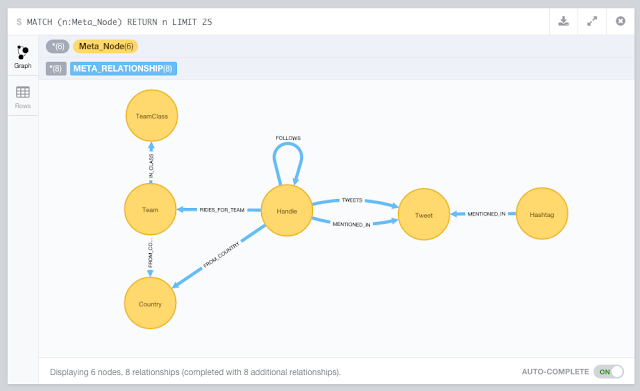
So let's go through this one by one. We will be using the following model to do so:
 

1. Importing the Cycling metadata into Neo4j

I wrote a couple of Cypher statements to import the data from CQ ranking:

//add some metadata //country info load csv with headers from "https://docs.google.com/a/neotechnology.com/spreadsheets/d/1lLD2I_czto1iA1OjCMAZZxnYLAVsngBgjT5c0xuvpJ0/export?format=csv&id=1lLD2I_czto1iA1OjCMAZZxnYLAVsngBgjT5c0xuvpJ0&gid=1390098748" as csv create (c:Country {code: csv.Country, name: csv.FullCountry, cq: toint(csv.CQ), rank: toint(csv.Rank), prevrank: toint(csv.Prev)});   //team info load csv with headers from"https://docs.google.com/a/neotechnology.com/spreadsheets/d/1lLD2I_czto1iA1OjCMAZZxnYLAVsngBgjT5c0xuvpJ0/export?format=csv&id=1lLD2I_czto1iA1OjCMAZZxnYLAVsngBgjT5c0xuvpJ0&gid=1244447866" as csv merge (tc:TeamClass {name: csv.Class}) with csv, tc match (c:Country {code: csv.Country}) merge (tc)<-[:IN_CLASS]-(t:Team {code: trim(csv.Code), name: trim(csv.Name), cq: toint(csv.CQ), rank: toint(csv.Rank), prevrank: toint(csv.Prev)})-[:FROM_COUNTRY]->(c);   //twitter handle info using periodic commit 500load csv with headers from "https://docs.google.com/a/neotechnology.com/spreadsheets/d/1lLD2I_czto1iA1OjCMAZZxnYLAVsngBgjT5c0xuvpJ0/export?format=csv&id=1lLD2I_czto1iA1OjCMAZZxnYLAVsngBgjT5c0xuvpJ0&gid=0" as csv match (c:Country {code: trim(csv.Country)}) merge (h:Handle {name: trim(csv.Handle), realname: trim(csv.Name)})-[:FROM_COUNTRY]->(c);   //rider info load csv with headers from "https://docs.google.com/a/neotechnology.com/spreadsheets/d/1lLD2I_czto1iA1OjCMAZZxnYLAVsngBgjT5c0xuvpJ0/export?format=csv&id=1lLD2I_czto1iA1OjCMAZZxnYLAVsngBgjT5c0xuvpJ0&gid=1885142986" as csv match (h:Handle {realname: trim(csv.Name)}), (t:Team {code: trim(csv.Team)}) set h.Age=toint(csv.Age) set h.CQ=toint(csv.CQ) set h.UCIcode=csv.UCIcodeset h.rank=toint(csv.Rank) set h.prevrank=toint(csv.Prev) create (h)-[:RIDES_FOR_TEAM]->(t);   //add the index on Handle create index on :Handle(name); create index on :Hashtag(name); create index on :Tweet(text); create index on :Handle(nodeRank); create constraint on (h:Handle) assert h.twitterId is unique;

As you can see, I also added some indexes. The entire script is also on Github.

The graph surrounding Tom Boonen now looked like this:


Once I had this, I could start adding the actually twitter info. That's next.

2. Importing the tweet data into Neo4j

As we saw previously, I had one CSV file for every day now. So how to iterate through this? Well, I did it manually, and create a version of this query for every day between April 1st and 30th.

//get the handles from the csv file //this should not do anything - as the handles have already been loaded above using periodic commit 500load csv with headers from "file:<yourpath>/20150401.csv" as csv with csv where csv.Username<>[] merge (h:Handle {name: '@'+lower(csv.Username)});   //connect the tweets to the handles using periodic commit 500load csv with headers from "file:<your path>/20150401.csv" as csv with csv where csv.Username<>[] merge (h:Handle {name: '@'+lower(csv.Username)}) merge (t:Tweet {text: lower(csv.Tweet), id: toint(csv.TweetID), time: csv.TweetTime, isretweet: toint(csv.IsReTweet), favorite: toint(csv.Favorite), retweet: toint(csv.ReTweet), url: csv.`Twitter URL`})<-[:TWEETS]-(h);

This file is also on Github, of course. I ran this query 30 times, replacing 20150401 with 20150402 etc etc... The result looked like this:
But obviously this is incomplete: we only have the tweets issued by specific riders now - and we would really like to know who and what they mentioned - in other words extract the handles and hashtags from the tweets. Let\s do that!

3. Processing the tweets: Extract the handles and the hashtags

I created two queries to do this - they are also on Github:
//extract handles from tweet text and connect tweets to handles match (t:Tweet) WITH t,split(t.text," ") as words UNWIND words as handles with t,handles where left(handles,1)="@"with t, handles merge (h:Handle {name: lower(handles)}) merge (h)-[:MENTIONED_IN]->(t);   //extract hashtags from tweet text and connect tweets to hashtags match (t:Tweet) WITH t,split(t.text," ") as words UNWIND words as hashtags with t,hashtags where left(hashtags,1)="#"with t, hashtags merge (h:Hashtag {name: upper(hashtags)}) merge (h)-[:MENTIONED_IN]->(t);
And that's when we start to see the twitter network unfold: multiple riders tweeting and mentioning eachother:


That's about it for this part 2. In the next section we will go into how we can enrich this dataset with more data about the connectedness between riders. Who is following who?

I hope you have liked this series so far. As always, feedback very welcome.

Cheers

Rik

Tuesday, 12 May 2015

Cycling Tweets Part 1: Who's who on Twitter

I have been a Cycling fan for a long time. Got into it at University a long time ago through some crazy friends that were already into it. And I have been on the bike ever since. Whether it's just for some grocery shopping and/or bar hopping in Antwerp, or for a longer holiday trip - or just for watching the pro riders in  CycloCross or Road racing - I am game for all of it. I even got my boys really excited about - watching legendary races like the Tour of Flanders or Paris-Roubaix together religiously.

So last March, I was thinking of yet another crazy Neo4j-experiment to do, and I thought about doing that on some cycling topics. After all, April is a "Holy Month" for cycling enthousiasts - many of the legendary "classic races" are happening during that month. So that's what I did. I will be detailing this over the next couple of blogposts - but suffice to say that I got into a bit of a project here, a journey that I gladly want to share with you.

So here it goes. This is part 1 of (what I think will be) 5 blogposts around Neo4j, graph databases, Twitter and Cycling. Hoping you will enjoy it.

Starting with the riders

The obvious idea I had was to try and do some work with some social networking data for the top riders in the pro cycling peloton. I follow some of these guys myself on my Twitter feed, but how would I be able to get to all the interesting ones like Tom Boonen, Fabian Cancellara, and others. I googled around a bit and found this site: CQ Ranking. In their own words: they are a ranking of Pro cycling riders that try to rank riders based on the past 12 performance - a bit like the UCI ranking of cyclists. And they provide some really cool data: here's an example of a sheet that you can download from their website.

One of the most interesting data elements that I found on the CQ website was the list of Twittering riders. This was almost exactly what I was looking for for my experiment, a long list of all the riders, their teams, their countries... and their twitter handles. Obviously there were going to be some mistakes/problems in this list, but still - it looked pretty sweet. So there I went, downloading everything and putting it all into a google spreadsheet for some data cleanup so that I could prepare it for an upload into Neo4j.

The only real thing that I had to do was to match the CQ ranking sheet with the with twittering riders. That was easy enough once I had both data sets different tabs of the google sheet: a simple VLOOKUP was all it took:
And then we got this sheet:
Interesting. Now I have a list of very interesting twitter accounts - what to do with them. This is when the first part of my experiment really started to materialise, and when I decided that I would love to know what all these interesting online characters would be up to in a Holy (!) month like this one. I would love to know what they were tweeting about, who they were mentioning, how they would be grouped together etc... So I needed to get to that data... 

Getting to the Twitter data

This turned out to be a bit more difficult than I thought it would be. Sure, Twitter gives you this API access to read from their vast datasets, but frankly, for a newbie like me these "rate limiting" rules are pretty confusing and intransparant. And plus - I don't really know how to code :) - so that really limited my options. So I tried a few things and then decided that the easiest way to get to all of these "April tweets" would be to create a new twitter account  (CycleF0ll0w) and then follow all of the accounts that I wanted to follow (from the spreadsheet). So that's what I did: a ghost twitter ID appeared: all it does is follow people - so that I have access to the timeline that contains the information I want.

In order to easily create the list of people that "I" followed, I used a tool called Tweepi: it allows for bulk creation of "follow" links really easily. I decided to go with the top 500 (as per their CQ ranking) riders - that should be more than interesting enough.

Exporting and Cleaning the timeline

So now I have a timeline. How do I get that to be extracted so that I can work with it and get it ready to be imported into Neo4j? Again, I investigated multiple options, but ended up going for a paid service: Exporttweet. On a daily basis, this service automatically created an Excel spreadsheet containing all the tweets appearing on my CycleF0ll0w timeline.
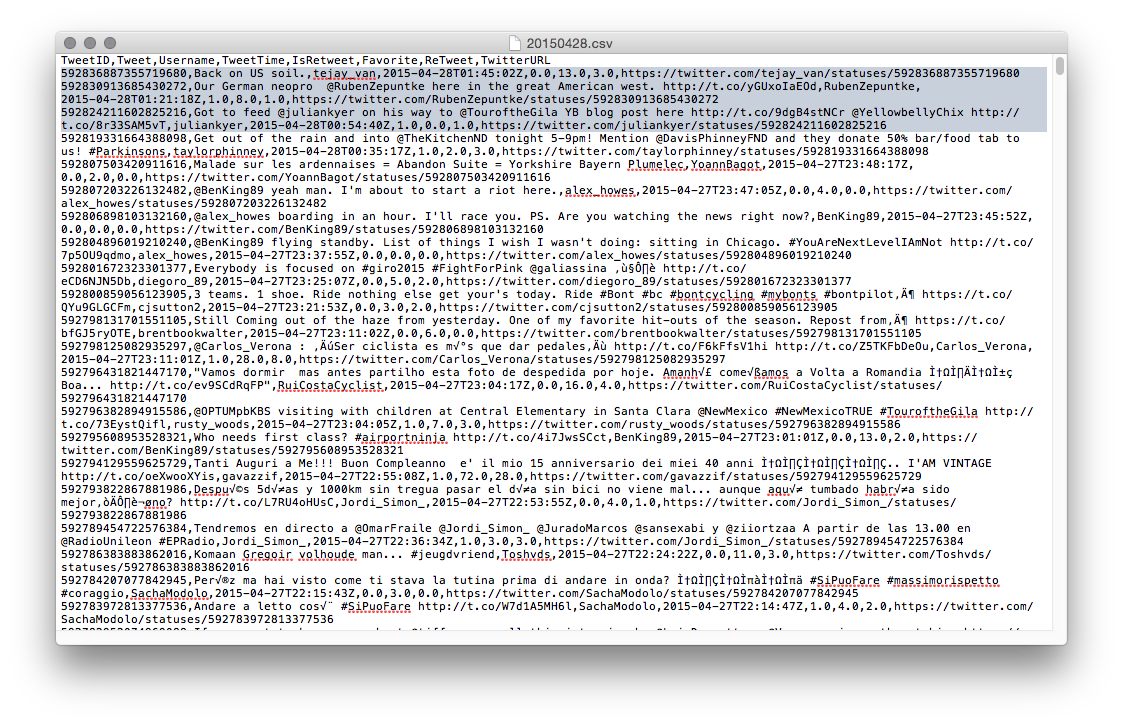
The output was really simple: an Excel file a day, keeps the doctor away!
Now all there was left to do was to clean these sheets up a bit. I used my tried and tested Open Refine install to do that:
It was mostly taking out special characters, renaming column names, and removing duplicates, and I ended up with a very simple set of Replay Refine operations based on the saved json file:
That was it. Now I had everything ready to get started:
  • a google doc with a bunch of metadata about riders (names, teams, rankings, twitter handles)
  • a timeline with all the tweets of these riders, and a way to export that into daily XLS files
  • an OpenRefine process to create CSV files out of these tweets on a daily basis. 
In the next blog post I will go and get started with this - and start having some fun with the data.

Hope you enjoyed this so far - already looking forward to part 2. As always, feedback welcome.

Cheers

Rik