Showing posts with label idms. Show all posts

Saturday, 15 November 2014

The IDMS EmpDemo - reloaded

A couple of weeks ago, I told the story of the interesting conversation that I had had with Luc Hermans about the similarities between IDMS and Neo4j. Luc gave me access to the EmpDemo dataset that ships with IDMS, and I sort of challenged myself saying that I would love to revisit his 2012 effort to import the data into Neo4j and do some queries on it. Not to see if you could migrate data from IDMS to Neo4j (that would be WAY more complicated, with all the software dependencies, of course), but just to explore the model similarities.

Now, several weeks later, I have something to show you. It's not always very pretty, but here goes :) ...

The IDMS schema file & sequential data

The IDMS input data was essentially structured in two files.
  1. The schema file. This file was pretty long and complicated, and describes the structure of the actual data records. Here's an excerpt for the "Coverage" data records:
     RECORD NAME IS COVERAGE  
          SHARE STRUCTURE OF RECORD COVERAGE VERSION 100  
          RECORD ID IS 400  
          LOCATION MODE IS VIA EMP-COVERAGE SET  
          WITHIN AREA INS-DEMO-REGION OFFSET 5 PAGES FOR 45 PAGES  
     *+    RECORD NAME SYNONYM IS COVERGE FOR LANGUAGE ASSEMBLER  
     *+    RECORD NAME SYNONYM IS COVRGE FOR LANGUAGE FORTRAN  
     *+    OWNER OF SET COVERAGE-CLAIMS  
     *+      NEXT DBKEY POSITION IS 4  
     *+      PRIOR DBKEY POSITION IS 5  
     *+    MEMBER OF SET EMP-COVERAGE  
     *+      NEXT DBKEY POSITION IS 1  
     *+      PRIOR DBKEY POSITION IS 2  
     *+      OWNER DBKEY POSITION IS 3  
          .  
     *+  02 SELECTION-DATE-0400  
     *+    USAGE IS DISPLAY  
     *+    ELEMENT LENGTH IS 8  
     *+    POSITION IS 1  
     *+    ELEMENT NAME SYNONYM FOR LANGUAGE ASSEMBLER IS COVSELDT  
     *+    ELEMENT NAME SYNONYM FOR LANGUAGE FORTRAN IS CVSLDT  
     *+    .  
    
    As you can see it is all about the "positions" of the data in the file: where does the record start, where do the fields in the record start and end - in the sequential file.
  2. The sequential file itself was a lot shorter in this case (it is just a small dataset). The coverage records mentioned above look something like this.
     C 00303011978110100000000F003  
      C 00403011975030100000000D004  
      C 00200031977012100000000M002  
      C 00400071978043000000000F004  
      C 00100111980092900000000M001  
      C 00200131981010200000000D002  
      C 00100161978010600000000M001  
    
    As you can see, all it is is a sequence of ASCII numbers that then need to be split up into the different fields, as defined in the schema above. Interesting. 
Unfortunately I can't share the actual files in public - but the above should give you a good idea what I started from.

Struggling with Sequential files - not my forte

Once I grasped these file structures a little bit, I continued to see how I could work with them to create an "importable" format for my Neo4j server. Turned out that was not that easy. I ended up using a two part process:


  1. I used a spreadsheet to convert the individual records into structured fields that I could work with. Here's the link to the google doc, if you're interested. Google Sheets has a function called "mid", that allows you to pick contents from a cell's sequential positions:

    which was exactly what I needed to do. Once I ficured that out, it was pretty easy to create the nodes in my Neo4j server. But how to extract the relationships???
  2. Turns out that I really did not manage to do that. I had to turn to Luc for help, and he basically managed to create a CSV file that used record IDs as the key to establish the relationships. Not pretty - and I still have no clue how he did that (let's just attribute it to the secret art of mainframe wizardry :)), but it did work...
Once I had this all I had to do was to use the structured information in my spreadsheet to generate cypher statements that would allow me to create the graph in Neo4j. That was easy. You can find the statements over here.

Updating the IDMS model to Neo4j

As I already mentioned in the previous blogpost, the similarities between IDMS and Neo4j data models are multiple, but there are also some differences. One of the most striking ones - for me at least - was how IDMS deals with many-to-many cardinalities in the data model. Including these types of relationships in IDMS requires the creation of a separate kind of "record", called a "Junction record". This is a the best explanation that I found over here:
For each many-to-many relationship between two entities, we will almost always identify additional attributes that are not associated with either of the two entities alone, but are associated with the intersection between the two entity types. This intersection is represented by another record type, called junction record type, which has one-to-many relationships with the two entity types. The junction record resolves the many-to-many relationship and implements this many-to-many relationship indirectly. 
Thinking about this some more: junction records are very similar to the relational database concept of a "join table". And as we know, we don't need stuff like that in Neo4j, as you can natively create these kinds of n to m relationships in Neo4j without having to think twice.

So that means that we need to make some updates to the data model, as Luc had already done in his effort. You can clearly see what needs to be done in the figure below:

In the IDMS data model we have three junction records:
  • the Emposition: relating the Employees to their jobs
  • the Expertise: relating the Employees to their skills
  • the Structure: creating a reporting line / managerial relationship between two employees.
So we need to write a Cypher statement that would update the graph accordingly. Here's an example of how I did that for the relationship between Employee and Job:

 //create direct link between employee and job (removing need for "Emposition" juncture record)  
 match (e:Employee)-[r1]-(emp:Emposition)-[r2]-(j:Job)  
 create (e)-[r:JOB_EMPLOYEE]->(j)  
 set r.EmpID=emp.EmpID  
 set r.StartDate=emp.StartDate  
 set r.BonusPercent=emp.BonusPercent  
 set r.SalaryAmount=emp.SalaryAmount  
 set r.OvertimeRate=emp.OvertimeRate  
 set r.EmpositionCode=emp.EmpositionCode  
 set r.CommissionPercent=emp.CommissionPercent  
 set r.FinishDate=emp.FinishDate  
 set r.SalaryGrade=emp.SalaryGrade;  
 //delete the redundant structure  
 //delete r1,r2,emp  

Note that the properties of the junction record (eg. startdate, salary, and others) are now moved from the junction record to a relationship property. Property graphs make relationships equal citizens, don't they! The full update statements that I created are over here. I have put the graph.db folder over here if you want to take if for a spin yourself.

So now, let's do some querying of this dataset with Cypher!

Querying the Reloaded EmpDemo with Cypher

One of the key differences between IDMS and Neo4j seems to be to me that we now have this wonderful query language at our fingertips to explore the network data. IDMS does have some query facilities (using a SQL overlay on top of native IDMS, as I understand it), but it seems to me like the Neo4j approach is a lot more flexible.

Here are some example queries:

 //what's in the dataset  
 match (n)  
 return labels(n), count(n)  
 order by count(n) DESC;  

Gives you the following result:

Or lets do some deeper queries:

 //Show employee and departments  
 match (e:Employee)--(d:Department)   
 return e.EmpLastName,d.DeptName   
 order by e.EmpLastName ASC  

Gives you:
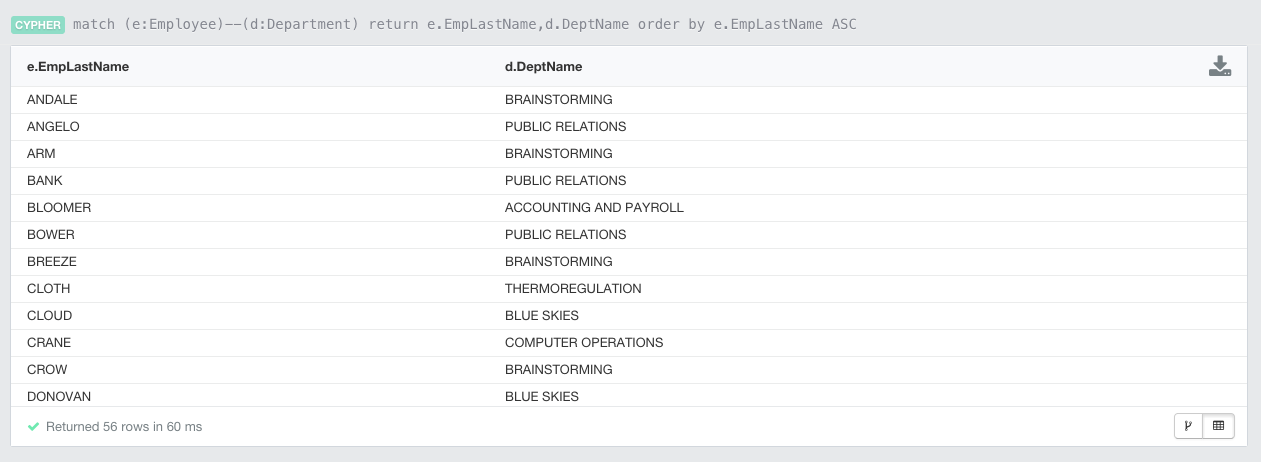
Of course we can also look at some more graphical representations of our newly reloaded EmpDemo.  To illustrate this, let's look for some shortestpaths between Departments and Skills (bypassing the junction records that we mentioned above):

 //Paths between departments and skills  
 match p=Allshortestpaths((d:Department)-[*]-(s:Skill))   
 return p  
 limit 5;  

This gives you the following result:
Or similarly, let's look for the paths between departments and the different types of claims. This is a bit more interesting, as have different kinds of claims (Dental, Hospital, and Non-Hospital) which currently all have different labels in our data model. We can however, identify them as they all have the same "COVERAGE_CLAIMS" relationship type between the coverage and the different kinds of claims. So that's how the following query was split into two parts:

 //paths between departments and claims  
 match (c)-[ccl:COVERAGE_CLAIMS]-(claim)  
 with c, claim  
 match p=Allshortestpaths((d:Department)-[*]-(c:Coverage))  
 return p,claim  
 limit 1;  

First we look for the Coverage "c" and the Claims "claim" and then we use the AllShortestPaths function to get the links between the departments and the coverage. Running this gives you this (limited to 1 example):

Finally, let's do one more query looking at a broad section of the graph that explores the Employees, Skills and Jobs in one particular department ("EXECUTIVE ADMINISTRATION"). The query is quite simple:

 //Employees, Skills and Jobs in the "Executive Administration" department  
 match p=((d:Department {DeptName:"EXECUTIVE ADMINISTRATION"})--(e:Employee)--(s:Skill)),  
 (e)--(j:Job)  
 return p,j;  

and the result gives you a good view of what goes on in this department:

Obviously you can come up with lots of other queries - just play around with it if you feel like it :)

Wrapping up

This was a very interesting exercise for me. I always knew about the conceptual similarities between Codasyl databases and Neo4j, but I never got to feel it as closely as with this exercise. It feels as if Neo4j - with all its imperfections and limitations that make it probably so much less mature than IDMS today - still does offer some interesting features in terms of flexibility and query capabilities. 

It's as if our industry is going full circle and revisiting the model of the original databases (like IDMS), but enhancing it with some of the expressive query capabilities brought to us by relational databases in the form of SQL. All in all, it does sort of reinforce the image in my mind at least that this really is super interesting and powerful stuff. The network/graph model for data is just fantastic, and if we can make that easily accessible and flexibly usable with tools like Neo4j, the industry can only win. 

Hope this was as useful and interesting for you as it was for me :) ... as always: comments more than welcome.

Cheers

Rik

Friday, 31 October 2014

Simulating the IDMS EmpDemo using GraphGen and GrapheneDB

A couple of weeks ago, someone put me in touch with Luc Hermans of P&V Group. Luc had done this presentation 2 years ago about loading the default CA IDMS EmpDemo database into Neo4j. That triggered my interest bigtime, as my recollection of IT history strongly remembers mainframe database technologies as the hotbed for many of our present-day data technologies.

On the wikipedia page it has a bit of background:
IDMS (Integrated Database Management System) is primarily a network (CODASYL) database management system for mainframes. It was first developed at B.F. Goodrich and later marketed by Cullinane Database Systems (renamed Cullinet in 1983). Since 1989 the product has been owned by Computer Associates (now CA Technologies), who renamed it Advantage CA-IDMS and later simply to CA IDMS.
If you think about it for a minute, you immediately understand that these technologies are conceptually very similar, and that "the EMPDEMO" would probably also be a great example of the power of Neo4j.

Now I would love to load the exact same dataset into Neo4j, and have been trying to redo Luc's exercise of loading the data into Neo4j myself. But it is not that easy if you don't have a mainframe background. The model, however is easy enough to understand. Here's the "old" IDMS model:

And Luc created this Neo4j graph model on top of that:
You can immediately spot the similarities, can't you! It's just very, very similar. In fact, the Neo4j model seems a bit easier, since the "junction" nodes in the IDMS model (that represent many-to-many and reflective relationships in the IDMS world) can be eliminated through properties on the direct relationships (see the orange Emposition, Expertise and Structure elements that can be eliminated from the IDMS model). Nevertheless IDMS and Neo4j seem to be - at least philosophically - very related technologies. Even the implementation has some shared characteristics, although I bet that any *real* expert will tell you that IDMS is way more powerful in some ways, but Neo4j is probably more flexible.

Simulating the EMPDEMO with Neoxygen GraphGen

While I was trying to actually do the import of the EMPDEMO sequential files into Neo4j - which I am sure I will succeed at doing, some day - I thought that it would very likely be way easier to "simulate" the same concepts that the EMPDEMO domain is representing, from a vanilla Neo4j install. How? By generating the dataset of course. So then I started thinking about how to do that, and the remainder of this post is going to be about that.

Turns out that Christoph Willemsen has been developing his suite of PHP tools for Neo4j, among which an incredibly lovely data generator, GraphGen. This is a brand new toolset that Christoph has made, and I must say it is absolutely lovely.

Using GraphGen is simple:

  • you describe your domain (ie. the EMPDEMO model that we have above) in a cypher like syntax, specifying the number of nodes that you want to be generating and the cardinality of the relationships that you want generated. It's really like translating the picture above into Ascii Art :) ... 
     
  • In my case, this looked like this:
 (empl:Employee {firstname:firstName, lastname:lastName} *100)-[:HAS_SKILL *n..n]->
(skill:Skill {name: progLanguage} *25)  
 (empl)-[:WORKS_AT_DEPT *n..1]->(dept:Department {id: {randomNumber: [2]}} *5)  
 (empl)-[:LOCATED_AT_OFFICE *n..1]->(office:Office {id: {randomNumber: [2]}} *10)  
 (empl)-[:HAS_JOB *1..1]->(job:Job {id: {randomNumber: [2]}} *2)  
 (empl)-[:HAS_COVERAGE *1..1]->(coverage:Coverage {id: {randomNumber: [2]}} *10)  
 (coverage)-[:HAS_CLAIM *1..n]->(HospClaim:HospitalClaim {id: {randomNumber: [2]}} *5)  
 (coverage)-[:HAS_CLAIM *1..n]->(NonHospClaim:NonHospitalClaim {id: 
{randomNumber: [2]}} *5)  
 (coverage)-[:HAS_CLAIM *1..n]->(DentClaim:DentalClaim {id: {randomNumber: [2]}} *5)  

  • you paste it into the website and you get something like this
    This is the direct link to it.
  • Once you've got that, you can download the cypher statements to generate the graph locally, or - and I can't tell you how useful that is, in my opinion - generate the database in one go. 
Let's take a look at that now.

From GraphGen to GrapheneDB - one simple click

Generating the database locally is of course one option - but in this case I think it is useful to experiment a bit using GrapheneDB. Maybe you have never used GrapheneDB - but let me tell you that it's pretty sweet for standard prototyping and experimentation. They have a free tier for sandbox graph databases:
This is plenty for most prototypes. In our case here, I will create the IDMSEMPDEMO sandbox database, and then... use the connection details specified below to connect GraphGen to it over the REST API.

Using the GraphGen system, I can now just immediately let the page generate the graph on YOUR GrapheneDB Neo4j server, through the REST API. It starts with some basic information:

and then all you need to do is wait a few seconds to have it complete:

Job done. Now I can start interacting with the graph on the Neo4j Browser hosted on Graphene.

Querying the Simulated EMPDEMO

Here's what the new Empdemo looks like in the shiny Neo4j Browser:
Now we can start thinking of some additional queries. I am no IDMS expert - on the contrary - but what I understood from my conversations with Luc is that you really need to think about the IDMS schema BEFORE you do any queries. If your query patterns are misaligned with the schema - then there's a redesign task to be done for it to work. That's very different to the Neo4j model. Of course, there's a clear and definite interaction between model and query pattern, and things may run more slowly/faster in one model as opposed to another model - but it will still be possible. And adjusting the model in Neo4j is... dead easy.

So here are some queries:

 //find employees  
 match (e:Employee) return count(e);  
 match (e:Employee) return e.firstname, e.lastname;  
   
 //find employee skills  
 match (e:Employee)-[:HAS_SKILL]->(s:Skill)  
 return e.firstname, e.lastname, count(s)  
 order by count(s) desc;  
   
 //find avg nr of employee skills  
 match (e:Employee)-[:HAS_SKILL]->(s:Skill)  
 with e, count(s) as nrofskills  
 return count(e), avg(nrofskills);  
   

Here's what the second query looks like in the Browser:

Many of those query patterns will be similar to what you could do in IDMS, but there are some query patterns that are perhaps a bit different. Like the following example: a pathfinding query:

 //find paths  
 match p=allshortestpaths((n:Employee {lastname:"Howe"})-[*]-(m:Employee 
{lastname:"Herman"})) return p limit 5;  

Doing that is really easy in Neo4j, and the results are very interesting:
Without knowing anything about the schema or the potential paths between two elements in the network, I can gain some interesting insights about the connections/relationships between my different entities.

This of course is just a start. But all I really wanted to do with this post was to highlight that
  • there is a very natural match/fit between the IDMS mainframe model, and the modern-day Neo4j model
  • It is trivial to simulate that model using fantastic new tools like GraphGen
  • It is even easier to actually take that model for a spin on GrapheneDB
Hope that was useful. As always, feedback is very welcome.

Cheers

Rik