Rambling thoughts about life in and around the data industry
Friday, 25 February 2022
Importing (BEER) data into Neo4j - WITHOUT CODING!
Importing data into a graph structure stored in a graph database can be a real pain. Always has been, probably always will be to some degree. But we can really make the pain be a lot more tolerable - and today's blogpost is going to be about just that. The reason for this is pretty great: Neo4j has just launched a new online tool that allowed me to make the whole process a really easy and straightforward experience - take a look at it at http://data-importer.graphapp.io.
So let me try to explain how it works in the next few paragraphs.
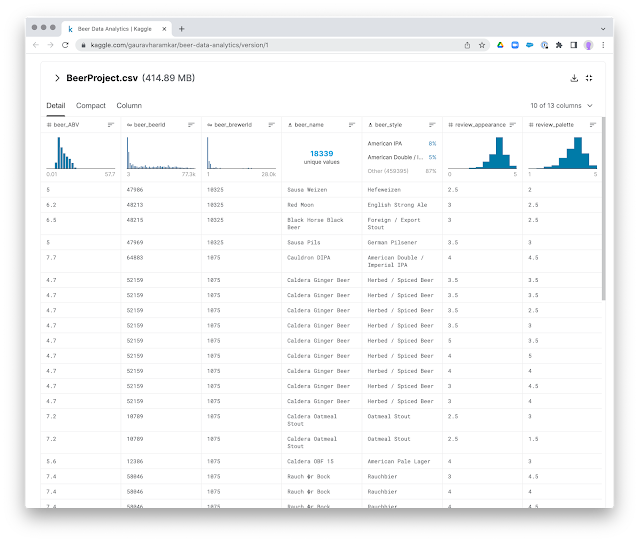
This dataset contains information about the different types of beers and various aspects of it such beer style, absolute beer volume, beer name, brewer name, beer appearance, beer taste, its aroma, overall ratings, review, etc. - and it does so in a single .csv file with about 500k rows. Cool.
Graphistania 2.0: The Lockdown Anniversary session
This weekend marked the 1 year anniversary of the "Covid era" - the time when many of us have been hunkered down at home, or close to home at least, to deal with the raging pandemic. It has been a strange couple of months, and while I personally have been able to deal with it quite comfortably, I must say that my heart has been going out to all the friends and families that have had a far worse time with this. I personally got to experience it first hand in the first couple of months of 2021, loosing a very dear friend to the virus and its awful disease, and will not easily forget this period of our lives.
But we do want to keep the fantastic drive and atmosphere of our Neo4j community up - it would be a terrible shame if we lost that, too, to the virus. So that's why me and Stefan are going to continue making these podcast episodes, at least for the foreseeable future. Not in the least because they are a ton of fun to make :) ...
So here's our latest chat. We have found a true treasure trove of great use cases and such in the Twin4j newsletter, which we will try to highlight:
RVB: 00:00:00.768 Hello, everyone. My name is Rik, Rik Van Bruggen from Neo4j, and yep, it's that time again. Yippee! Yeah. We have another podcast recording day, and for that, I have my dear friend Stefan on the other side of this Zoom call. Hey, Stefan.
SW: 00:00:18.130 Hello, Rik. Nice to be back here with you.
RVB: 00:00:20.830 Hey, there.
SW: 00:00:21.733 Coming back from a week of vacation, so very nice to be back, and what better way to get your graph mind up and running than to hang out with you here in this lovely podcast?
RVB: 00:00:33.018 I hope so too. Thanks for being here, and I hope you had a good holiday. And it's been two months, Stefan, so we really need to get our act together. It's been a very busy--
SW: 00:00:43.185 Holy crap.
RVB: 00:00:44.057 --couple of months, but. We try to do these things once a month, but that didn't work in February, and so we've got a lot to talk about, actually. And maybe I'll just kind of frame it for you. I went through all of the Twin4j this week, the Neo4j newsletters over the past couple of weeks, and I found some really interesting themes. And maybe we can talk about those for a bit. There's three of them. Is that okay?
SW: 00:01:16.179 Yeah, yeah. Let's go. I think that should be super fun.
RVB: 00:01:20.885 Yeah. So the first one I wanted to talk about is, basically, use cases. I mean, we see this all the time in our community, really, right? That there's these unbelievable interesting use cases popping up. There's a couple of them that popped up in the newsletters. The first one is actually dear to my heart. It's something that I started working on back in 2012 when I first joined Neo4j. It's protein interaction networks. Have you taken a look at that one?
SW: 00:01:50.023 Yeah. That was an amazing one. As always with those kind of things, when there is-- this was written by Tomaz, right? So I started--
RVB: 00:02:01.558 Tomaz, [crosstalk].
SW: 00:02:02.277 --reading the article, but then halfway through the article, I was like, "Oh, but I better just try it out." That's how I learn. So I ended up running this, and it is so neat that this is, in some sort of way, so accessible. I think for me, that is super cool in that. So I find it extremely interesting and also because of the simplicity of it and how complex it is, even if it's just such a simple thing as a protein that interacts with another protein, basically, at the foundation, and it's still amazing. I think it's kind of mind boggling in that sense, so.
RVB: 00:02:44.678 A little story from my side: when I first started working with Neo4j, we did some work with the University of Ghent here in Belgium, and they were working on a topic called metaproteomics, which is exactly this, interactions of proteins. And they struck a nerve with me because one of their most important research customers was, of course - drumroll - a brewery.
SW: 00:03:13.135 Of course. I was wondering, "Where is this going to go?"
RVB: 00:03:17.022 Yes.
SW: 00:03:17.797 There it was. Brewery time again.
RVB: 00:03:18.825 There it is. Yeah.
SW: 00:03:20.664 There it is.
RVB: 00:03:21.182 It was a beer brewery, and they were basically saying yeasts that are being added to brewing systems, they create these protein interactions, and if you better manage those protein interactions, you can actually influence the brewing and the taste of the brew by doing so. So that was an interesting one. I had a good time exploring that. There was another one, Stefan, around asset management. This is a very well-known one as well, right? Things like configuration management databases, building information management. It's all about managing assets, isn't it? It's a very networked problem.
SW: 00:04:06.005 Yeah, yeah. And also, this is one of the use cases that seems to pop up more and more often in customer or prospect interactions, I think, so I think it's going to be very helpful for people. So go check it out if you are interested in that. I think that would be very neat to do that.
RVB: 00:04:29.195 But I know you want to skip to the third one that we had [crosstalk].
SW: 00:04:32.095 Yeah, the big one. This is what I'm kind of waiting for, like, "How can we get to this point faster?" Ha ha!
RVB: 00:04:37.534 Yeah. "How can we get to that third point faster?" which is, of course, the use case of getting to Mars and NASA. It was all over the news in the past couple of weeks, obviously, but yeah, that story of how David Meza from NASA-- he's the - how do you call it? - chief knowledge management architect or something like that with NASA, and he worked on that Lessons Learned database in Neo4j. Super cool, right? It's so good.
SW: 00:05:12.489 Yeah. It's super good. I think the use case is good. The interview is also great. David is also very relaxed, I think, also. Ashley - or what is the name of the girl interviewing? - is also doing a great job. There's very good chemistry in there, really enjoyed it. And again, of course, anyone that was dreaming about going to space as a kid, imagine working with such a thing. I mean, it can't get better. This is the moment when you go to work, and you go, "Holy crap. I'm so proud now." But I think it's an interesting thing on how much this actually speed up time for them, right? How much is saved not only time, in that sense, but also taxpayers' money, right?
RVB: 00:05:59.053 Of course.
SW: 00:05:59.211 I think that's what I keep coming back to in talking about use cases. So you can do a lot of things with a lot of technologies, right? So very often, people ask me, "How can I use Neo?" Right? But then I say, "You can do it for this, but you can, of course, do this with your old technology, in theory. However, if that theory takes you two years, maybe you can't really do it in practice." So I keep coming back to think about that, and I think this is such a good showcaser on that. It's a great YouTube clip here, so for those that have a hard time reading or just want to listen while-- I was saying commuting to work. Apparently, commuting to your working room should be better now, in these times. But I really enjoyed it. Happy to see it, so yeah, hope you like it as well.
RVB: 00:06:49.604 Cool. Yeah. It was super nice. And there's another, I mean, theme to the newsletters in the past couple of months. I've seen so many-- it's kind of like a use case, but it's also a technology foundation of people that are using graphs in combination with natural language processing, right? I saw a number of posts from Jesús, our colleague, who was talking about RDF-related work, WordNet, those types of things, but there's also people that are doing really interesting work on extracting new knowledge from existing documents, right? Were you able to make any sense of that?
SW: 00:07:39.354 Yeah. And I think it's like this is also one of those kind of super untapped-- and I think it's also a perfect bridge from NASA, right? Because literally, that was what they were doing. They had the answers; they just couldn't see it, right? So it's a classical, "You can't see the forest because of all the trees," right? So I think that is really interesting. And I think also, there is a great post about-- I think it was called From Text to Knowledge: The Information Extraction Pipeline or something, basically where Tomaz then explained why he see a combination of NLP and graphs as one path to explainable AI, right? And I think this is also one of those topics that are super important from a lot of things to kind of understand but also compliance and a lot of things, right? So I think this is also one of those kind of areas, use cases, or whatever you want to call it that literally are exploding on all different kind of verticals, you may almost use as a word there. But yeah, I think that, again, our--
RVB: 00:08:44.103 Yeah. Well, it's been very popular in domains where there's a lot of documentation, right? So academics, pharmaceuticals, patterns, legal texts, all those things have been really a great showcase for this type of work, I think.
SW: 00:09:04.354 Yeah. No, but as you're saying, I can see anything from academia, patterns-- I mean, I don't know how many of these kind of works that we have done with prospects and really kind of tapping into this kind of super kind of deep knowledge, but you can't see the new perspective because it is just a lot of deep silos, right? So in that sense, it's super graphy, and I think when people start to see it, this is also where they get so excited so were almost screaming, "Take my money," and I was like, "Calm down. Behave good. What is it that you're thinking of answering, or what is the thing that would help you," right? It doesn't have to be the money query, but just don't throw technology at the problem. So be mindful of what you want. I mean, we can see it a lot. I think one of the interesting parts is also looking upon the entire web, scraping information and making sense of it and treating that as a kind of a knowledge grab itself. It's also one of a neat couple of projects that I'm working on personally. Yeah. So there's a lot of funny things to do with the NLP and knowledge graphing combination, I think.
RVB: 00:10:19.330 Yep, totally. Well, what strikes me there-- and this is a perfect segue to our third theme. What strikes me is that it's becoming so much easier to do this, right? So NLP a couple of years ago, that was just so exotic and difficult to use. You basically had to have some kind of a computer science degree or a PhD to be able to use it, but these days, the tools that we have to implement some of these techniques are super accessible. I mean, even a lost sales guy like me can use it. Do you know what I mean? It's pretty usable, even in its basic form. So I wanted to talk about some of the really interesting tools that we see emerging in our community. The one that I was so happy about, to finally see it fully released, is the Arrows app. I think you've used it for a long time already when it was still in an alpha or beta stage, and now it's--
SW: 00:11:26.893 Exactly.
RVB: 00:11:27.278 --actually been released. Alistair Jones' pet project is now finally out there in the wild. Great, though, right? I mean, really great.
SW: 00:11:37.420 Yeah. No, but I think it's so useful in so many ways, of course, for graph modelling, where it was intended, right? And I have a couple of memories working with a lot of C-level people trying to help them understand the power of connected data and so on. So they're not going to write any code, but what we tend to do is do some modelling practices and basic cipher, and for that, I use Arrows. And one of the constant feedback that I get because of the simplicity of the tool and how it naturally kind of lends your thinking to this kind of graph thinking idea is that, every single one of these sessions, these CEOs, COOs are coming back to me like, "Oh, this is a really good way of thinking of the business, the different domain, and how it's connected. It has given me tons of new ideas." So in that sense, that kind of doubled down as a ideation kind of tool almost, if it makes sense, but I think that's such a cool kind of thing, right? If you're going to build an app or if you have a business logic or anything, that really helps you to kind of map it out in that sense. So it's also kind of neat to see that and to see those people, also, stepping into the graph arena. But yeah.
RVB: 00:12:53.804 Yep. That frame also. Yeah. So Arrows is one of those really amazing tools, but there's other things that are coming up, right? We've all known about the GRANDstack, the development framework that's been around for quite some time. A new release for that and new features, capabilities there, and some examples, also, for people to use and to abuse, I would say.
SW: 00:13:18.057 Use and abuse. That's a perfect way to do it.
RVB: 00:13:19.407 Use and abuse, yeah.
SW: 00:13:21.935 Just dive in there and try.
RVB: 00:13:22.283 And then another one that I wanted to mention was I've really enjoyed using this tool that Niels created called NeoDash. It's a graph app that plugs into the Neo4j browser and allows you to put together dashboards on top of Neo4j. Really no-code development, that type of thing, super easy to use. I was very impressed by that, how accessible it's made everything.
SW: 00:13:52.996 Yeah. And I think that's such a great part because I think just the ability to do something without that no code. Of course, that is in the topic with the cloud itself, one of those kind of things that you can really see how accessible these are. But seeing people with no previous knowledge just trying and fiddling around there, they kind of stumble upon the solution almost. That simple. I think the NeoDash is such a great kind of application for just exploring or visualising the data that you have in a graph that you normally would not use. So we tend to try it out with a lot of the nontechnical people when we work, and it works like a charm every single time. There is literally almost no studying kind of to get started, so I again encourage you, as with all articles, use and abuse, right? Dive in, try around because actually, you're going to get kind of far by just doing that. And that is, I think, a common theme for all of these. You can really see how this whole paradigm of connected data is changing, which is, of course, super cool.
RVB: 00:15:17.502 Yeah, absolutely. Well, I mean, so many other things to talk about. What we'll do is when we get to the blog post created together with this recording, we'll also put all the links to the amazing Twin4j newsletter items and the blog posts and everything all together, and then people can have a look, have a play, use and abuse, and that should set them on their path for even more graph adoption, right? So that's the [crosstalk] idea.
SW: 00:15:50.313 Even more graph adoption. Yeah. And I'm also going to squeeze in a last one because we also had the GDS 1.5 release, right? And there's a great piece on it from Amy and Alicia, two of my most inspiring colleagues. They have taught me a lot of things and are super nice as well. So it's about the new supervised machine learning workflows in Neo4j, so imagine that being even accessible to just try. I can't even think of this. If I would have guessed this five years ago, I'd be like, "Nah, that's not going to happen."
RVB: 00:16:29.543 It was impossible. Yeah, exactly.
SW: 00:16:31.365 "That's impossible. You can't do that on your computer at home in your sofa." But I think that's so cool. So that's a great article by Amy and Alicia; go check it out as well. I'm going to push that in there, but we're going to, of course, post the links, as I said.
RVB: 00:16:48.591 We will, for sure. Well, Stefan, thank you so much for taking the time running through this with me and making a little bit more sense out of it. It was great talking to you. You know that we want to keep these things shortish, at least, so we're going to wrap it up for now, and we're going to try to have this one published soon and then do another one in April, right? We should [crosstalk].
SW: 00:17:14.412 Yes, of course, 1st of April. I will record it from my new podcast studio in the barn in [inaudible] in southern Sweden.
RVB: 00:17:22.097 Ooh.
SW: 00:17:23.410 Ooh, yes. And then--
RVB: 00:17:25.195 I look forward to that one.
SW: 00:17:26.657 --as soon as we get to travel, this is a standing invitation for you to come join me and also for any of our listeners. Bear in mind--
RVB: 00:17:37.641 Absolutely [crosstalk].
SW: 00:17:37.964 --COVID restrictions has to be better before that, so I am not encouraging any anti-vaccine behaviour here, but as soon as we are allowed to travel, come join us. It's going to be a great talk about graphs.
RVB: 00:17:51.294 Fantastic. Thank you, Stefan. It was great talking to you, and I'll talk to you soon.
SW: 00:17:55.905 Likewise. Bye.
RVB: 00:17:57.591 Bye.
Hope you enjoyed that as much as we did. If you have any comments or questions, just reach out!
Working for Neo Technology has many, many upsides. I love my job, love my colleagues, love our product, love our market - I think you can pretty much say that I am a happy camper. But. There's always a but. At least a couple times a week I am confronted with things that make me go "Oh no, not that again!" And "that" is usually about one particular topic: Importing data into Neo4j. Many, smart people are having trouble with it - and there are many reasons for this. So let's start zooming into this Gordian Knot - and see if we can untie it - without having to cut it ;-) ...
The Graph Database Import Knot
The first thing that everyone should understand that, in a connected world, importing data is, per definition more difficult to do. It is a true "knot" that is terribly difficult to untie, for many different reasons.
Just logically, the problem of importing "connected" data is technically more difficult than with "unconnected" data structures. Importing unconnected data (eg. the nodes of your graph model) is always easy/easier. Just dump it all in there. But then you come to importing the connections, the relationships, and you find that there's no such thing as an "external entity" (aka "the database schema") that is going to be ensuring the consistency and connectedness of the import. You have to do that yourself, and explicitly, by importing the relationships between a) a start node that you have to find, and b) an end node that you have to lookup. It's just ... more complicated. Especially at scale, of course.
So how to untie this knot? I can really see two steps that everyone needs to take, in order to do so:
Understand the import problem. Every import is different, just like every graph is different. There is little or no uniformity there, and in spite of the fact that many people would love to just have a silver bullet solution to this problem, the fact of the matter is that there is none - at least not today. So therefore we will have to "create" a more or less complex import solution for every use case - using one of the tools at hand. But like with any problem, understanding the import problem is often the key to choosing the right solution - so that's what I will focus on here as well.
Pick the right tool. There are many tools out there, and we should not be defeated by the law of the instrument - and use the right tool for the job. Maybe, this article can help in bringing these different tools together, bring some structure to them, and then - even though I have not used all tools, but I have used a few - I can also tell you about my experiences. That should allow us to make some kind of a mapping between the different types of Import problems, and the different tools at hand.
So let's give it a shot.
YOUR import scenario
Like I said before: one import problem is different from the next one. Some people want to store the facebook social graph in neo4j, other people just want to import a couple of thousand proteins and their interactions. It's really, very different. So what are the questions that you should ask yourself? Let me try and map that out for you:
This little mindmap should give you an insight into the types of questions you should ask yourself. Some of these are project related, others are size/scale related, others are format related, and then the final set of questions are related to the type of import that you are trying to do.
The Tools Inventory
If you have ever visited the neo4j website, you have probably come across the import page. There's a wealth of information there around the different types of tools available, but I would like to try and help by providing a bit of structure to these tools:
So these tools range from using a spreadsheet - which most of use should be able to wield as a tool - to writing a custom piece of software to achieve the solution to the import problem at hand. The order in which I present these is probably very close to "from easy to difficult", and "from not so powerful to very powerful".
So let's start doing a little assessment on these tools. Note that this is by no means scientific - this is just "Rik's view of the world".
Very easy: all you need to do is write some formulas that concatenate strings with cell content - and compose cypher statements this way. These cypher statements can then just be copied into the neo4j-shell.
Only works at limited scale (< 5000 nodes/relationships at a time). Performance is not good: overhead of unparametrized cypher transactions. Quirks in copying/pasting the statements above a certain scale. Piping the statements in can work on OSX/Linux - but not on Windows.
So if this assessment is close enough, then how would we map the different import scenarios sketched above, to these different tools? Let's do an attempt at creating that.
Mapping the scenario to the inventory
Here's my mapping:
So there is pretty much a use case for every one of the tools - it's not like you can discard any of them easily. But, if you would ask my subjective assessment, here's my personal recommendation:
the spreadsheet way is fantastic. It just works, and it's quick to get something done in no time. I still use it regularly.
neo4j-shell-tools is my personal favourite in terms of versatility. Easy to use, different file format support, scales to large datasets - what's not to like?
for many real-world solutions which require regular updates of the database - you will need to write software. Just like you used to do with your relational databases system - nothing's changed there!
Hope this was a useful discussion - if you want you can download the entire mindmap that I used for this blogpost from over here.