Showing posts with label spreadsheet. Show all posts

Wednesday, 31 October 2018

Data Lineage in Neo4j - an elaborate experiment

For the past couple of years, I have had a LOT of conversations with users and customers of Neo4j that have been looking at graph databases for solving Data Lineage problems. Now, at first, that seemed like a really fancy new word used only by hipster technovangelists to try to appear interesting, but once I drilled into it, I found that it’s actually something really interesting and a really cool application of graph databases. Read more on the background of it on wikipedia (as always), or just live with this really simple definition:
“Data lineage is defined as a data life cycle that includes the data's origins and where it moves over time. It describes what happens to data as it goes through diverse processes. It helps provide visibility into the analytics pipeline and simplifies tracing errors back to their sources.”
That’s easy enough. Fact is that it’s a really big problem for large organisations - specifically financial institutions as they have to comply with regulations like the Basel Committee on Banking Supervision's standard number 239 - which is all about assuring data governance and risk reporting accuracy.

Here’s a couple of really nice articles and videos that should really give you quite a bit of background.
 

Thursday, 3 July 2014

Using LoadCSV to Import data from Google Spreadsheet

My colleague Rickard recently did a great graphgist on Elite:Dangerous trading. When I read his post, the first thing that struck me was that he had found a great clever way to import data into Neo4j. And since I have been into data imports for a while, I decided to take it for a spin, and write it up for you.

The mechanism uses two fundamental capabilities:

  • Google Spreadsheets have a great capability to export the data into a CSV format. That export capability generates a unique URI that you can download the CSV of a specific sheet in the spreadsheet from. 
  • Neo4j's Load CSV capability can leverage data that is located at **any** URI. The data does not have to be local - it can be anywhere on the network.
So let's give this a try. 

Preparing the Google Spreadsheet

What we want to do is to put some sample data into a spreadsheet first.
You can find that actual sheet over here. Clearly it's not a very big sheet - we are just trying to do a little test.

Now, in order to export this file to CSV, and to make that export accessible over the internet, we need two things: 
  1. the spreadsheet needs to be publicly accessible over the internet. Otherwise Google will ask you to authenticate first, and the Neo4j Load CSV process will not know how to do that.
  2. you need to generate the download URI of the CSV export. That is very simple too. First you do the export:


    And then you take a look at your browser download history to figure out what the URI of the download was. Easy:


    You can copy that URI from there (in this case it is this ugly thing!)- and then we move on to the next stage: importing into Neo4j.

Importing the data into Neo4j

That Import process is very simple now, with Load CSV. Here's the query that I wrote, which uses the URI of the CSV version of the spreadsheet (in green):

It's very simple. First I add the colours using a MERGE, then I connect the persons to their respective colours using a create. Running that import gives me results in a matter of milliseconds, and with no intermediate steps:
And although this graph is very haphazard and not very interesting, I can query it straight away.


That's all there is to it really. Importing data was already way easier with LoadCSV, but thanks to Rickard, we can now do it straight from a Google Spreadsheet. Thanks Rickard!

Hope this was useful.

Cheers

Rik


Monday, 13 January 2014

The Making of - my genealogy graph database

Quite a few people asked me "how did you create the genealogy graph?" - well: here's your answer in a quick 5min video.


Hope this is useful.

Cheers

Rik


Thursday, 9 January 2014

Leftovers from the holidays: Genealogy Graphs!

Of all the graphy posts that I have written over the past 18 months, this is probably one of the ones that is closest to my heart. Beer-posts not included of course - those are in a category of their own :) ... This is a post about my family, and a tale of how a tiny little experiment led to a couple of very late graphy nights.

Mid-life crisis schmisis!

So maybe a bit of context. The fact is that I turned 40 a couple of months ago, and with that, in spite of what you may think, there has been a surprising lack of crisis. I feel good about my age, have no problem getting older, don't feel any need whatsoever to go off and race around on a loud Harley Davidson or something. But. Maybe this is completely unrelated, but I have found myself to do something else. I have gotten a lot more interested in the most basic of things: family history. I have been playing around with old photographs, scanning them and trying to make something out of them - and more stuff like that.


So a couple of weeks before Christmas, I discover a new website that I had never heard of before: geni.com. I spent some time playing around it, and found the concept of "social genealogy" really interesting. Geni allows you to share your tree with people in the tree, and then lets them work together with you on completing the information. Next thing I know I share it with my dad, he shares it with an uncle, and next thing you know old dusted boxes of family history are being opened. One of these boxes contained a lot of research done by my great-grand-uncle (the brother of my grandfather's father), Alphonse Van Bruggen. He's the priest in the picture below:


The fact that he was a priest is relevant: he had access to all of the baptism registries in Belgium/The Netherlands, and was extremely well placed to do some family tree research. And he did. At a family party this last Christmas break, I got my hands on his hand-written notes full of details, names, birthdates, burial dates, places, etc etc. It was an amazing piece of information - I still can barely believe that I found this.


Next thing I know I end up inputting all of this data into Geni. It was a lot of work - two late nights went into this. It's now an amazing tree that many of my family members are working together on - and which dates back to Jan van Brugel - my oldest ancestor - at the end of the 17th century. 

I can make a graph out of that!

Then of course my mind starts thinking: wouldn't it be great if I could do more with this data? After all - this is not just a "family tree"! It's a family graph - all the different trees (my own family, my inlaws, my mother's family, my dad's family, etc.) interact here, and it is clearly something that could really benefit from something like a graph database. So I started to look around, noticed that I could export a GedCom file from geni, and that there are tools like Gramps around that allow you to read these files offline. Gramps actually allowed me to export my family tree into a CSV file - and then... you know I love spreadsheets ... it was just one more step away to create a google spreadsheet doc that would allow me to prepare my import. I used the good old spreadsheet import method here - the dataset is just a couple of hundred nodes and relationships.

The model I chose to work with is as follows (courtesy to the wonderful graphjson.io tool for the colours): people have labels (male/female), are in relationships, and have kids as part of that relationship. 

I must admit that I had a couple of data quality issues at first, but I spent some time troubleshooting the dataset and was able to get a neo4j database with my entire family network in a matter of minutes rather than hours. Result!

Some interesting family queries!

Let's take a look at some interesting queries that I was able to write with this dataset.

Find my kids!

match (rik:male {FirstName:"Rik"}),
(kids)-[:CHILD_OF]-(relationship:relationship)-[:IS_MAN_OF]-rik,
(spouse:female)-[:IS_WOMAN_OF]-relationship
return kids.FirstName, kids.LastName;

And there they are:


Easy! So let's try something more difficult. 

Find my grandfathers!

This is the query I wrote to find my own grandfathers - a bit more difficult as it involves using a UNION statement to combine the two grandfathers from both my father's and my mother's side of the family into one resultset.

match (rik:male {FirstName:"Rik"})-[:CHILD_OF]->()<-[:IS_MAN_OF]-(father:male)-[:CHILD_OF]->()<-[:IS_MAN_OF]-(grandfather1:male)
return grandfather1.FirstName as FirstName, grandfather1.LastName as LastName
UNION
match
(rik:male {FirstName:"Rik"})-[:CHILD_OF]->()<-[:IS_WOMAN_OF]-(mother:female)-[:CHILD_OF]->()<-[:IS_MAN_OF]-(grandfather2:male)
return grandfather2.FirstName as FirstName, grandfather2.LastName as LastName;

and there they are:


But to be honest: I thought this was terribly complicated. So decided to try and make things easier.

Inferring fatherhood/motherhood

Part of the complexity of the query above is simply because we have to traverse through a relationship everytime we want to find a child of a parent. Seems like an unnatural and complicated things to do. Wouldn't it be nicer if we had a model that looked more like this:

At first I was uneasy about this, as I felt that I was duplicating information in my model, but after reading Mark's article on the topic I decided to just go with it - it would make life a lot easier. So to implement  this, I would need to infer the FATHER_OF and MOTHER_OF relationships, by executing a cypher query that would update the graph. The query goes like this:

match (child)-[:CHILD_OF]->(rel:relationship)-[:IS_MAN_OF]-(father:male),
(rel)<-[:IS_WOMAN_OF]-(mother:female)
create mother-[:MOTHER_OF]->child<-[:FATHER_OF]-father;

Simple enough! So let's see what this would do to the grandfather query:

match (rik:male {FirstName:"Rik"})<-[:FATHER_OF*2..2]-grandfather1
return grandfather1.FirstName as FirstName, grandfather1.LastName as LastName
UNION
match (rik:male {FirstName:"Rik"})<-[:MOTHER_OF]-()<-[:FATHER_OF]-grandfather2
return grandfather2.FirstName as FirstName, grandfather2.LastName as LastName;

That's a lot more readable in my book. And one of the nice things is that these new relationships would actually allow me to easily follow my lineage all the way back to the 17th century roots of my family tree:

match (rik:male {FirstName:"Rik"})<-[:FATHER_OF*]-(lineage:male)
return lineage;

gives me this:


All the way left are me and my sister. All the way right is Jan Van Brugel.

Learning more about life in the past few centuries

Obviously, now with this dataset in neo4j, I could ask lots of other questions:

Age of my forefathers

match (n:male) 
where NOT n.Birthdatenumber = "Unknown" AND NOT n.Deathdatenumber = "Unknown" 
return n.FirstName as FirstName, n.LastName as LastName, (n.Deathdatenumber-n.Birthdatenumber)/365 as Age
order by Age DESC;


Not a "bad" result - but not a very exciting one either. Chances of getting over eighty seem slim, based on this historical performance :) ...

Childhood deaths

This one's actually more encouraging: 
match (n)
where n.Deathdatenumber <> 'Unknown' AND n.Birthdatenumber <> 'Unknown'
with n, (n.Deathdatenumber-n.Birthdatenumber) as Age
return n.FirstName as FirstName, n.LastName as LastName, n.Birthdate, Age
order by Age ASC
limit 5;


Seems like in 3 centuries worth of (incomplete) data, we only had three babies die within the first 100 days. Tragic as that is - it still seemed like an ok number, especially if you know the huge advances in medical care that we have made in Western Europe over the past century.

Multiple relationships? Check!

And then of course the question to end all questions: how many of my ancestors had more than one wife? Here's the cypher query:

match (r1:relationship)-[:IS_MAN_OF|IS_WOMAN_OF]-(n)-[:IS_MAN_OF|IS_WOMAN_OF]-(r2:relationship)
return distinct n.FirstName as FirstName, n.LastName as LastName, n.Birthdate as Birthdate;

And again, it yielded an encouraging result:


Only 4! I think my missus will feel reassured :) ...

So that's about it. I must say that this was one blogpost that I more than enjoyed writing - it was fantastic to explore my family history, and use the wonderful world of graphs and neo4j while doing so. I will not be publishing the database - in the interest of my family's privacy - but am happy to discuss if you are interested in knowing more.

Hope this was interesting and/or useful.

All the best.

Rik

Friday, 6 December 2013

Untying the Graph Database Import Knot

Working for Neo Technology has many, many upsides. I love my job, love my colleagues, love our product, love our market - I think you can pretty much say that I am a happy camper. But. There's always a but. At least a couple times a week I am confronted with things that make me go "Oh no, not that again!" And "that" is usually about one particular topic: Importing data into Neo4j. Many, smart people are having trouble with it  - and there are many reasons for this. So let's start zooming into this Gordian Knot - and see if we can untie it - without having to cut it ;-) ...

The Graph Database Import Knot

The first thing that everyone should understand that, in a connected world, importing data is, per definition more difficult to do. It is a true "knot" that is terribly difficult to untie, for many different reasons.

Just logically, the problem of importing "connected" data is technically more difficult than with "unconnected" data structures. Importing unconnected data (eg. the nodes of your graph model) is always easy/easier. Just dump it all in there. But then you come to importing the connections, the relationships, and you find that there's no such thing as an "external entity" (aka "the database schema") that is going to be ensuring the consistency and connectedness of the import. You have to do that yourself, and explicitly, by importing the relationships between a) a start node that you have to find, and b) an end node that you have to lookup. It's just ... more complicated. Especially at scale, of course.

So how to untie this knot? I can really see two steps that everyone needs to take, in order to do so:
  1. Understand the import problem. Every import is different, just like every graph is different. There is little or no uniformity there, and in spite of the fact that many people would love to just have a silver bullet solution to this problem, the fact of the matter is that there is none - at least not today. So therefore we will have to "create" a more or less complex import solution for every use case - using one of the tools at hand. But like with any problem, understanding the import problem is often the key to choosing the right solution - so that's what I will focus on here as well.
  2. Pick the right tool. There are many tools out there, and we should not be defeated by the law of the instrument - and use the right tool for the job. Maybe, this article can help in bringing these different tools together, bring some structure to them, and then - even though I have not used all tools, but I have used a few - I can also tell you about my experiences. That should allow us to make some kind of a mapping between the different types of Import problems, and the different tools at hand.
So let's give it a shot.

YOUR import scenario

Like I said before: one import problem is different from the next one. Some people want to store the facebook social graph in neo4j, other people just want to import a couple of thousand proteins and their interactions. It's really, very different. So what are the questions that you should ask yourself? Let me try and map that out for you:


This little mindmap should give you an insight into the types of questions you should ask yourself. Some of these are project related, others are size/scale related, others are format related, and then the final set of questions are related to the type of import that you are trying to do. 

The Tools Inventory

If you have ever visited the neo4j website, you have probably come across the import page. There's a wealth of information there around the different types of tools available, but I would like to try and help by providing a bit of structure to these tools:


So these tools range from using a spreadsheet - which most of use should be able to wield as a tool - to writing a custom piece of software to achieve the solution to the import problem at hand. The order in which I present these is probably very close to "from easy to difficult", and "from not so powerful to very powerful". 

So let's start doing a little assessment on these tools. Note that this is by no means scientific - this is just "Rik's view of the world".

ProsCons
SpreadsheetsVery easy: all you need to do is write some formulas that concatenate strings with cell content - and compose cypher statements this way. These cypher statements can then just be copied into the neo4j-shell.Only works at limited scale (< 5000 nodes/relationships at a time). Performance is not good: overhead of unparametrized cypher transactions. Quirks in copying/pasting the statements above a certain scale. Piping the statements in can work on OSX/Linux - but not on Windows.
Neo4j-shell
Cypher StatementsNative toolset - no need to install anything else. Neo4j-shell can be used to pipe to in OSX/Linux - which can be very handy.You have to create the statements (see above). If they are not parametrized, they will be slow because of the parsing overhead.
neo4j-shell-toolsFantastic, rich functionality for importing .csv, geoff and graphml files. Not a part of the product (yet). Requires a separate install.
Command line
batch importerHigh-performance, easy to use (if you know maven).Specific purpose, for CSV files. Currently does not have easy install procedures.
ETL tools
TalendOut of the box, versatile, customizable, uses specific Neo4j connector - both in online and offline modes.Requires you to learn Talend. Current connector not yet upgraded to neo4j 2.0.
MulesoftOut of the box, versatile, customizable, uses the JDBC connector in online mode.Requires you to learn Mulesoft. No batch loading of offline database supported.
Custom Software
Java API
High Performance, perfectly customizable, supports different input types specific for your use case!
You have to write the code!
REST API
Spring Data Neo4j

So if this assessment is close enough, then how would we map the different import scenarios sketched above, to these different tools? Let's do an attempt at creating that.

Mapping the scenario to the inventory

Here's my mapping:


So there is pretty much a use case for every one of the tools - it's not like you can discard any of them easily. But, if you would ask my subjective assessment, here's my personal recommendation:
  • the spreadsheet way is fantastic. It just works, and it's quick to get something done in no time. I still use it regularly.
  • neo4j-shell-tools is my personal favourite in terms of versatility. Easy to use, different file format support, scales to large datasets - what's not to like?
  • for many real-world solutions which require regular updates of the database - you will need to write software. Just like you used to do with your relational databases system - nothing's changed there!

Hope this was a useful discussion - if you want you can download the entire mindmap that I used for this blogpost from over here.

All the best

Rik
Wednesday, 9 October 2013

Connecting NeoOffice to Neo4j

Lots of people have blogged about using the jdbc driver for neo4j. This was a project that was initially created by Rickard Oberg, and has been released quite some time ago for neo4j 1.9 and 2.0. Take a look at the neo4j.org jdbc page for many different examples and desscriptions.


In this blogpost, I will be focussing on one of the integrations that could be very useful for non-technical, end-user computing style people like myself. I have blogged before about how you can use a spreadsheet to import data into neo4j, but now, what I would like to demonstrate here is how easy it is to generate a spreadsheet with data that is coming straight from a neo4j cypher query. Let’s say that I have a complex query, one with multiple “joins” and that I am using neo4j to get neo4j to get some decent performance on these queries.


So what do I need:
  • a running neo4j database. I will use my beergraph as a dataset and run some of these queries as examples.
  • the jdbc driver. Download the binaries and install them. Dead simple. Detailed instructions are on the github page.
  • NeoOffice (a Mac-savvy fork of LibreOffice/OpenOffice - which coincidentally shares the first three letters with my favorite database ;-)) to open up the jdbc connection and then fire of the Cypher queries.
Let’s dig right in.


Three Steps


In order to successfully use the jdbc driver from neooffice to generate the speadsheet, there are essentially two steps:
  • the “database” step: this creates a neooffice database (this is the equivalent of an MS Access database) and registers the connection to neo4j via the jdbc driver as a datasource. It will allow me to define the queries that I want to run, test the results, and prepare for using these queries in the neooffice spreadsheet.
  • the “spreadsheet” step: use the datasource that we defined above, and easily get stuff into the neooffice spreadsheet for further investigation, manipulation and reporting - the things that people typically do in their spreadsheets.
  • the “end-user computing” step: how can I then start doing typical spreadsheet operations, straight onto the neo4j database.
Let’s go through this step by step and show you how easy it is.

Step 1: the Database step


Let’s assume that you have your neo4j server running on your localhost, and that you have loaded the beergraph dataset


In NeoOffice, we then have to create the connectivity to this running server, by creating a database document. In that creation process, you will then have the option to connect to an existing database through JDBC, as you can see in the screenshot below:


Next, you will have to register two things:
  • the Datasource URL: this should be neo4j://localhost:7474, or a different hostname/portnumber if your neo4j instance is not running on the your local machine / the default ports.
  • the JDBC driver class: this should be org.neo4j.jdbc.Driver. You can push the “Test class” button to see if the connection was correctly installed. Should be easy.
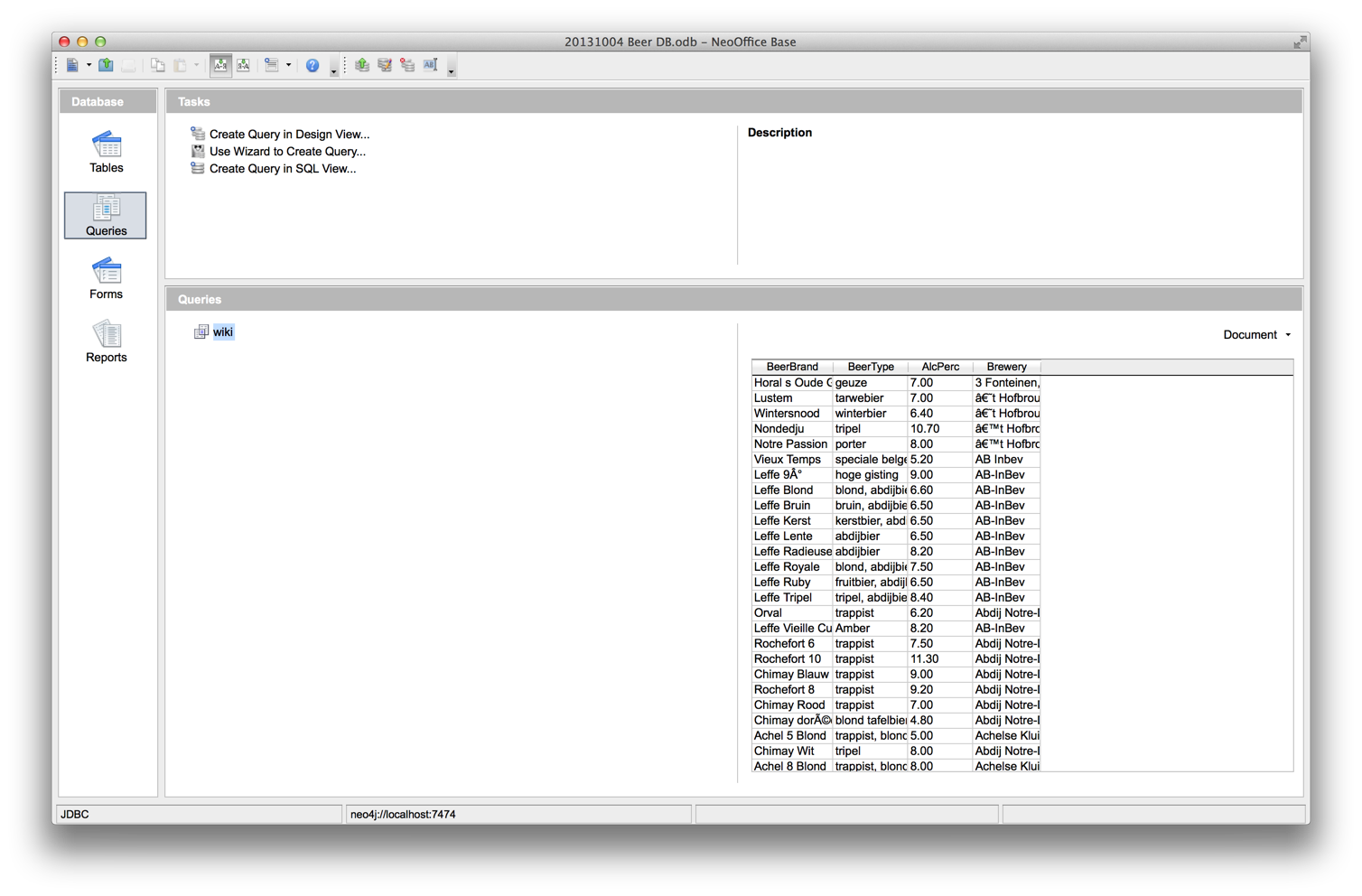
Then, we will have the empty database document (= the equivalent of an Access Database in MS Office), and we can start running queries. Add a new query, choose “Create query in SQL view”, and then you will have a blank query editor to play with. This is where you can then add a Cypher query. The query that we will use here is a very specific one: it’s the query that will recreate the original dataset (as converted from the wikipedia page to a google doc, see previous posts). It goes as follows:


START
beerbrand=node:node_auto_index(type="BeerBrand")
MATCH
beerbrand-[:IS_A]->beertype,
beerbrand-[:HAS_ALCOHOL_PERCENTAGE]->alcperc,
brewery-[:BREWS]->beerbrand
RETURN
beerbrand.name as BeerBrand,
beertype.name as BeerType,
alcperc.name as AlcPerc,
brewery.name as Brewery;

Running this query in the neo4j-shell gives you something like this:


Let’s copy and paste that into the query window, save, give the query a name (in our case "wiki"). Please do remember to push the little “Run SQL Command directly” button , as it will deal with the fact that … we are not running SQL, but indeed using Cypher over the JDBC connector.
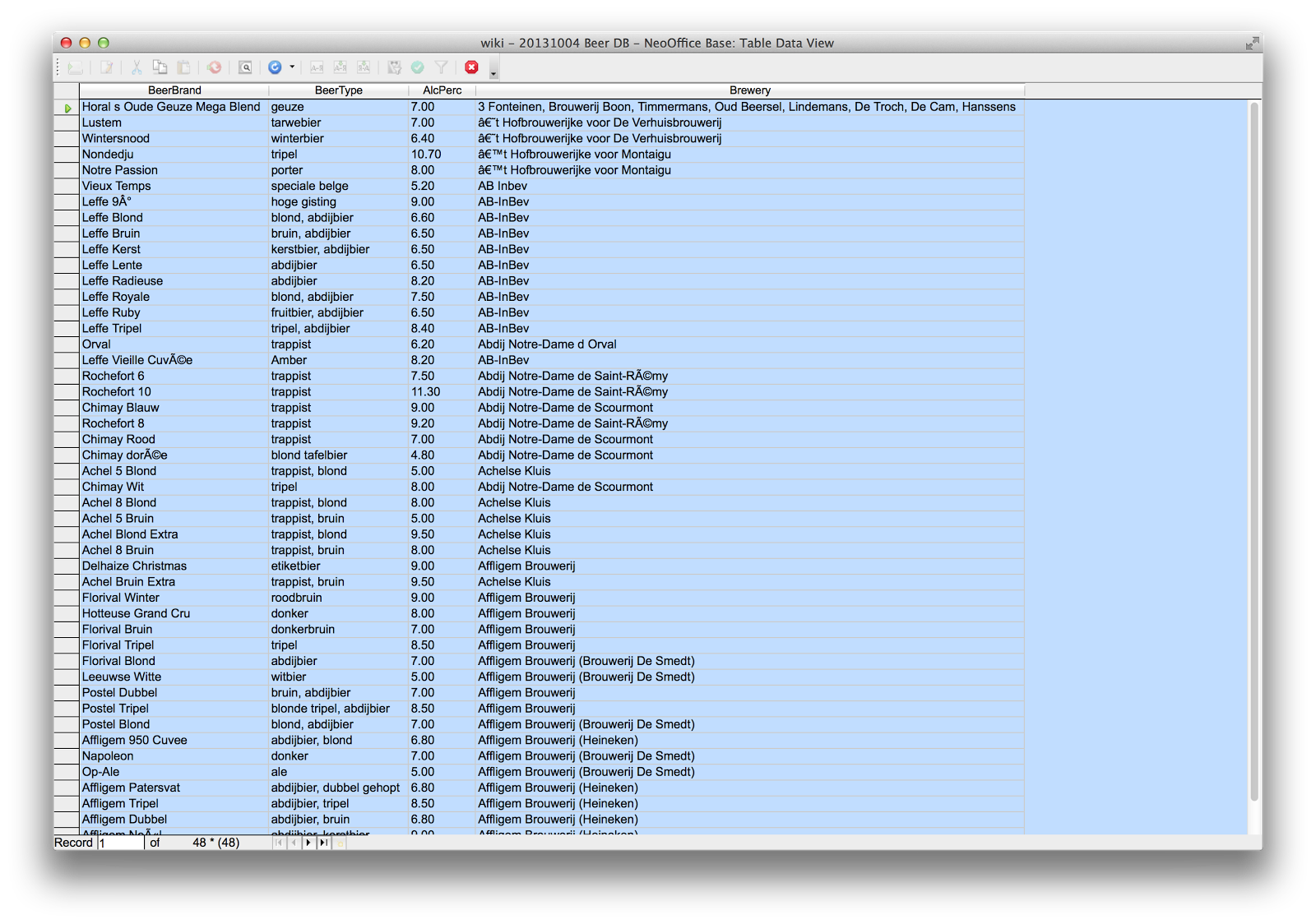
If you then try out the query by double clicking it in the main database window, you should get something very similar to what we are looking for:


So that completes the first step of this exercise. We have our JDBC connectivity set up between the NeoOffice database and neo4j, and a working query to play around with. Now for the spreadsheet part.

Step 2: the spreadsheet step


This second part is actually terribly easy. All we need to do is
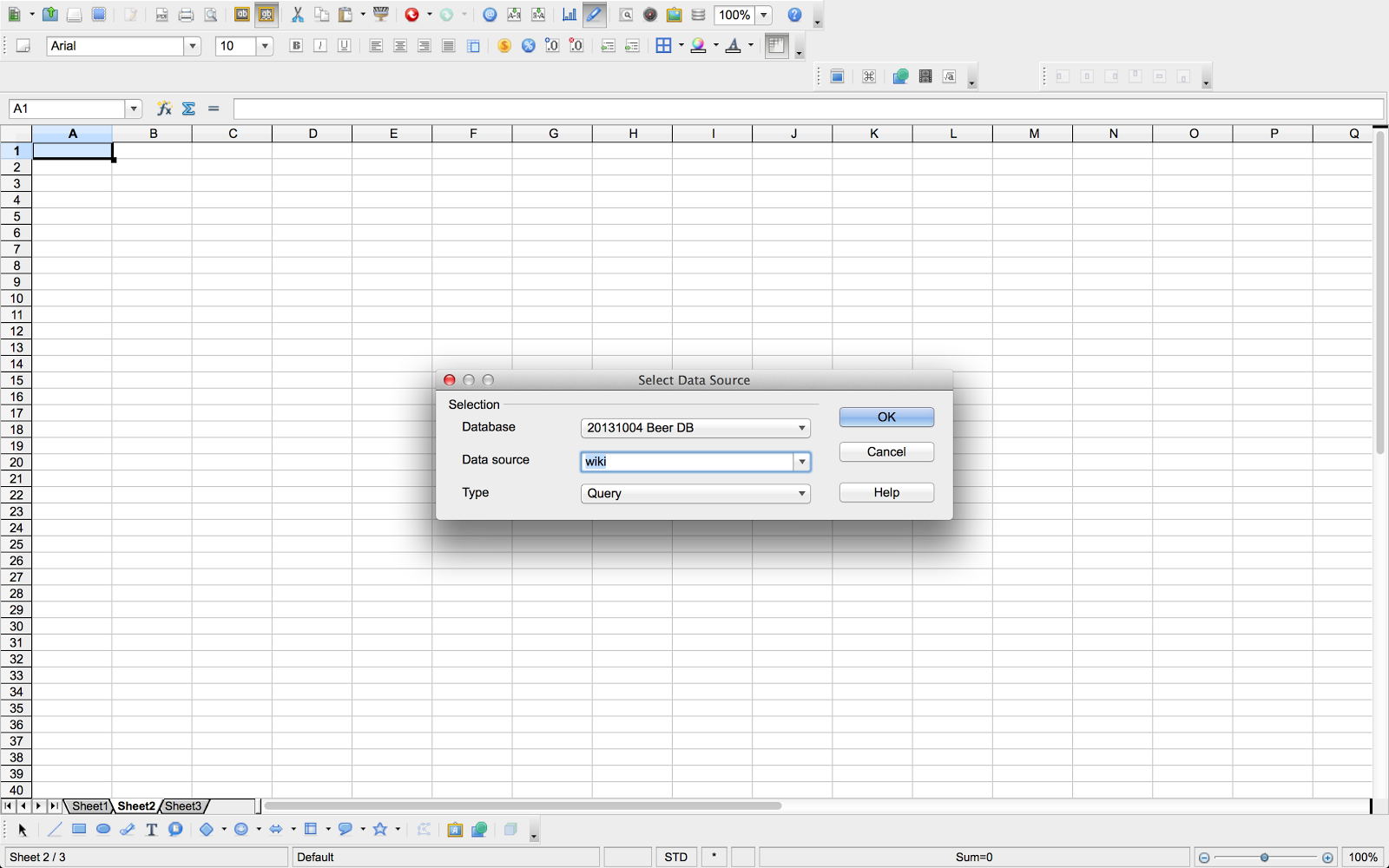
  • in the “View” menu of the spreadsheet, we enable the “Data Sources” view. This will then open up a “database” window within the spreadsheet document. Our newly created database - see step 1 above - should now appear in the list of datasources, and our query (in my example, I called the query “wiki”) should also appear as soon as you fold the queries open.
  • create a new spreadsheet document
  • simply double-clicking the query now gives you access to the query results, within the spreadheet’s top window


The remaining step then, is to copy the query result data into the spreadsheet cells. There’s two ways to do that:
  • select the query results in the top right window, position the spreadsheet cursor in the cell that you want the data to go to, and then click the “Data to Text” button
  • just grab the query name (top left sub-window) and drag it to the cell that you would like to put it in

As you can see, we now have the data in a very comparable format to what we started from.


Step 3: the end-user computing step


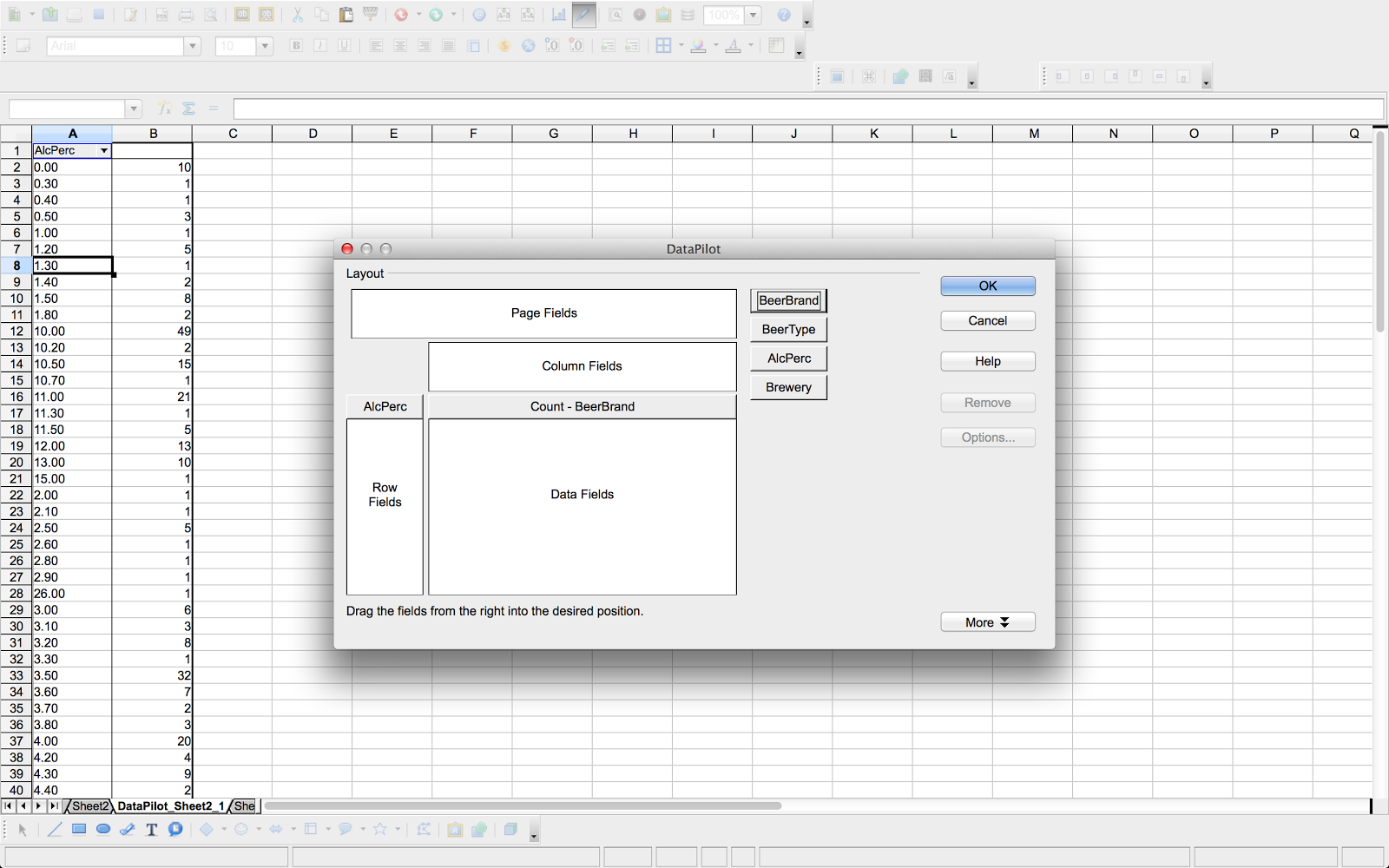
A logical final step then, is to allow the connectivity and spreadsheet integration that we demonstrated above, to do end-user spreadsheet manipulations, like creating a PivotTable/DataPilot sheet that allows me to better understand my dataset.


NeoOffice has a very easy interface to do these things: just start the DataPilot wizard from the “Data” menu in the spreadsheet, and click “Start”.
Then, we reuse the work we did above, and select the registered datasource to base our work of.

The “wiki” query that we executed above, is available under the “query” section, and we can then proceed to the actual construction of the pivottable. We do this by dragging the appropriate “fields” (columns in our cypher resultset) onto the different parts of the pivottable. Once we are ready, we get the following, dynamically composed graph summary table.


I am sure that there are many other things that you can think of doing this way.

Conclusion


I hope that in this post, we have given you a good overview of how you can integrate a traditional software package like NeoOffice/OpenOffice with an advanced, graph-based datastore like neo4j. The possibilities of this connectivity are endless - and we wish you happy hours of data exploration to come.


All the best


Rik