Showing posts with label twitter. Show all posts

Sunday, 24 May 2015

Cycling Tweets Part 5: querying the CycleTweets

After parts 1 to 4 of this series where we have mostly been loading and tweaking data for the Cycling Tweets, now it's time to have some fun querying this dataset with Cypher.

All of the queries are on Github, but let me just walk you through a couple more interesting ones.

Warming up the "Cypher Muscles"

Let's start with something easy, just to get the "Cypher Muscles" going:
//degree of handlesmatch (h:Handle)-[:TWEETS]->(t:Tweet)return h.name, h.realname, count(t)order by count(t) DESClimit 10
This query gives us the "degree" (the number of "TWEETS") relationships of a "Handle" node) of the nodes in our dataset, and a first indication of what to look for further on:
 Turns out that this is quite interesting. Very few of the "top gun" cyclists seem to be the top Tweeters. The only one that really stands out I think is Luca Paolini - the others are basically excellent riders, but not the "top guns". At least not in my opinion/experience of the sport.

So lets take a look at the #hashtags. Which ones are most mentioned in Tweets?
//most mentioned handles or hashtagsmatch (h)-[:MENTIONED_IN]->(t:Tweet)return h.name, labels(h), count(t)order by count(t) DESClimit 10
And the result is kind of obvious:
The big races like Paris-Roubaix and the "Ronde van Vlaanderen" (#RVV, or "Tour of Flanders") are the top mentions.

Using the NodeRanks

As you may remember from part 4 of this blogpost series, we used the GraphAware framework to calculate the PageRank of the different nodes in our dataset. So let's take a look at that:
 You immediately see the "big guns" (like Tour de France winners Alberto Contador, Chris Froome, Cadel Evans) pop out. But this does not say a lot - so we want to do a bit more exploration of these top riders and see what they are really connected to.

"Impossible is Nothing" with the power of WITH

To paraphrase my dear friend Jim Webber, "Impossible is Nothing" with Cypher and Neo4j.

Because here's the thing. When I was starting to do this little project, I did not know what I was going to find. I really didn't. Of course I knew a bit about Neo4j, I am a fan of cycling, but still... it was all kind of an experiment, a jump into the unknown. So this is where I fell in love - again - with Neo4j, Cypher, and the way it allows you to interactively and iteratively explore your data - hunting out the hidden insights that you may not have thought of beforehand.

A key tool in this was the "WITH" clause in Cypher. From the manual:
The WITH clause allows query parts to be chained together, piping the results from one to be used as starting points or criteria in the next.
So that means that I can basically iteratively query my dataset, and use the result of one iteration as input for the next iteration. Which is very powerful in my opinion. So here's what I did with the "top ranked" nodes:

  • First I explored which other nodes are connected to these top-ranked ones, using WITH:
//what is connected to the top NodeRanked handlesmatch (h:Handle)where h.nodeRank is not nullwith horder by h.nodeRank DESClimit 1match (h)-[r*..2]-()return h,rlimit 50

This gave me a nice little overview:
However, because I had to "LIMIT" the result, it felt as if I was artificially skewing the view. So lets take a second pass at this.


  • Second, I looked at the labels of the nodes that are directly connected to the single one top ranked node:

//what is connected to the top NodeRanked handles at depth 1match (h:Handle)where h.nodeRank is not nullwith horder by h.nodeRank DESClimit 1match (h)--(connected)return labels(connected), count(connected)limit 25
And I can do something very similar by just tweaking the query to find out what is connected at dept 2 or 3...

//what is connected to the top NodeRanked handles at depth 3match (h:Handle)where h.nodeRank is not nullwith horder by h.nodeRank DESClimit 1match (h)-[*..2]-(connected)return labels(connected), count(connected)order by count(connected) DESC
The order of the result is a bit different then:


So that gave me some good feel for the dataset. Again:I think it's mostly this interactive query capability that makes it so interesting.

Betweenness on a subgraph

So then I thought back to some work that I did last year to try and implement Betweenness Centrality in Cypher. The result of that was clearly that it was pretty easy to do, but... that it would be very expensive to do so on a large dataset. I think this would be a prime candidate for another Graphaware component :) ... but let's see if we can use WITH to

  • first find a subgraph of interesting suspect nodes
  • then calculate the betweenness on these suspect nodes
Turns out that this was pretty straightforward. Here's the query:

//betweenness centrality for the top ranked nodes - query using UNWIND//first we create the subgraph that we want to analysematch (h:Handle)where h.nodeRank is not nullwith horder by h.nodeRank DESClimit 50//we store all the nodes of the subgraph in a collection, and pass it to the next queryWITH COLLECT(h) AS handles//then we unwind this collection TWICE so that we get a product of rows (2500 in total)UNWIND handles as sourceUNWIND handles as target//and then finally we calculate the betweenness on these rowsMATCH p=allShortestPaths((source)-[:TWEETS|MENTIONED_IN*]-(target))WHERE id(source) < id(target) and length(p) > 1UNWIND nodes(p)[1..-1] as nWITH n.realname as Name, count(*) as betweennessWHERE Name is not nullRETURN Name, betweennessORDER BY betweenness DESC;
Here's the result:


As you can see - this is quite interesting. It's clear that there are a number of lesser known riders that are very "between" the top guns (in terms of PageRank).

Wrapping it up with some pathfinding

So last but not least, we need to do some pathfinding on this dataset. In my experience, that always gives away some interesting insights.

So let's experiment with two very well known riders, Tom Boonen (former world champ and winner of the Tour of Flanders and Paris Roubaix multiple times) and Alexander Kristoff (this year's winner of the Tour of Flanders). Here's the simple query:
//the link between Boonen and Kristoffmatch (h1:Handle {name:"@kristoff87"}), (h2:Handle {realname:"BOONEN Tom"}),p = allshortestpaths ((h2)-[*]-(h1))return p
The result is:


But then my suspicion is that the Teams that these riders belong to are actually really important. So lets take a look:
//the link between Boonen and Kristoff and their teamsmatch (h1:Handle {name:"@kristoff87"}), (h2:Handle {realname:"BOONEN Tom"}),p = allshortestpaths ((h2)-[*]-(h1))with nodes(p) as Nodesunwind Nodes as Nodematch (Node)--(t:Team)return Node, t
As you can see we are using the same principle as above: WITH ties it all together.


That's about it, folks. There are so many other things that I would love to do with this dataset (Community detection is high on my wishlist) - but I think 5 parts to a blogpost series is probably enough :) ...

I guess you could have seen from this series of blogposts, that I am a bit into Cycling, and that I enjoy working this stuff with Neo4j. It's been a lot of fun - and a bit of effort - to get all of this done, but overall... I am pretty happy with the result.

Please let me know what you thought of it too - would love to get feedback.

Cheers

Rik

Thursday, 21 May 2015

Cycling Tweets Part 4: Ranking the Nodes

In the previous couple of blogposts in this series (here's part 1, part 2 and part 3 for you), I have explained how I got into the Cycling Twitterverse, how I imported data from a mix of sources (CQ Ranking, TwitterExport, and a Python script talking to the Twitter API), and thereby constructed a really interesting graph around Cycling.

There's so many more things to do with this dataset. But in this post, I want to explore something that I have been wanting to experiment with for a while: The GraphAware Framework. Michal and his team have been doing some real cool stuff with us in the past couple of years, not in the least the creation of a couple of very nice add-ons/plugins to the Neo4j server.

One of these modules is the "NodeRank" module. This implements the famous "PageRank" algorithm that made Google what it is today.
It does this in a very smart way - and also very unintrusively, utilising only excess capacity on your Neo4j server. It's really easy to use. All you need to do is

  • drop the runtimes in the Neo4j ./plugins directory
  • activate the runtimes in the Neo4j.properties file that you find in your Neo4j ./conf directory. 
Here's what I added to my server (also available on github):

//Add this to the <your neo4j directory>/conf/neo4j.properties after adding //graphaware-noderank-2.2.1.30.2.jar and //graphaware-server-enterprise-all-2.2.1.30.jar //to <your neo4j directory>/plugins directory   com.graphaware.runtime.enabled=true  #NR becomes the module ID: com.graphaware.module.NR.1=com.graphaware.module.noderank.NodeRankModuleBootstrapper   #optional number of top ranked nodes to remember, the default is 10 com.graphaware.module.NR.maxTopRankNodes=50   #optional damping factor, which is a number p such that a random node will be selected at any step of the algorithm #with the probability 1-p (as opposed to following a random relationship). The default is 0.85 com.graphaware.module.NR.dampingFactor=0.85   #optional key of the property that gets written to the ranked nodes, default is "nodeRank" com.graphaware.module.NR.propertyKey=nodeRank   #optionally specify nodes to rank using an expression-based node inclusion policy, default is all business (i.e. non-framework-internal) nodes com.graphaware.module.NR.node=hasLabel('Handle')   #optionally specify relationships to follow using an expression-based relationship inclusion policy, default is all business (i.e. non-framework-internal) relationships com.graphaware.module.NR.relationship=isType('FOLLOWS') #NR becomes the module ID: com.graphaware.module.TR.2=com.graphaware.module.noderank.NodeRankModuleBootstrapper   #optional number of top ranked nodes to remember, the default is 10 com.graphaware.module.TR.maxTopRankNodes=50   #optional damping factor, which is a number p such that a random node will be selected at any step of the algorithm #with the probability 1-p (as opposed to following a random relationship). The default is 0.85 com.graphaware.module.TR.dampingFactor=0.85   #optional key of the property that gets written to the ranked nodes, default is "nodeRank" com.graphaware.module.TR.propertyKey=topicRank   #optionally specify nodes to rank using an expression-based node inclusion policy, default is all business (i.e. non-framework-internal) nodes com.graphaware.module.TR.node=hasLabel('Hashtag')   #optionally specify relationships to follow using an expression-based relationship inclusion policy, default is all business (i.e. non-framework-internal) relationships com.graphaware.module.TR.relationship=isType('MENTIONED_IN')
As you can see from the above, I have two instances of the NodeRank module active. 
  1. The first attempts to get a feel for the importance of "Nodes" (in this case, the nodes with label "Handle") by calculating the nodeRank along the "FOLLOWS" relationships. After just half an hour of "ranking" we get a pretty good feel:

    This seems to be confirming - in my humble opinion - some of the more successful riders in April, for sure. But also confirms that the "big names" (Contador, Froome, Cancellara) are attracting their share of Twitter activity no matter what.
  2. The second does the same for the "Topics" (in this case, the nodes with the label "Hashtag") along the the "MENTIONED_IN" relationships.

    The classic races are clearly "top of mind" in the Twitterverse! But upon investigation I have also found that there are a lot of confusing #hashtags out there that make it difficult to understand the really important ones. Would love to investigate a bit more there.
Like I said before, the GraphAware framework is really interesting. It gives you the opportunity to make stuff that you could also do in Cypher more easily, faster, and more consistently. I really liked my experience with it.

Hope this was useful for you - as always feedback is very very welcome.

Cheers

Rik

Sunday, 17 May 2015

Cycling Tweets Part 3: Adding "Friends" to the CyclingGraph

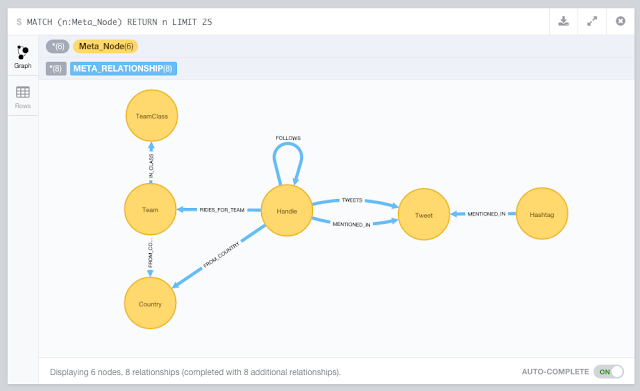
In this 3rd part of this blogpost series about Cycling (you can find part 1 and part 2 in earlier posts) we are going to take the existing Neo4j dataset a bit further. We currently have the CQ Ranking metadata in there, the tweets that we exported all connected up to the riders' handles, and then we analysed the tweets for @handle and #hashtag mentions. We got this:

Now my original goal included having a social graph in there too: the "friends" relationships for different twitterers could be interesting too. Friends are essentially two-way follow-relationships - where two handles follow each other, thereby indicating some kind of closer relationship. It's neatly explained over here. So how to get to those?

Well, I did some research, and while there are multiple options, my conclusion was that really you would need to have a script that would talk to the twitter API. And since we also know that IANAP (I AM Not A Programmer), I would probably need a little help from my friends.

Friends to the rescue: my first python script

Turns out that my friend and colleague Mark Needham had already done some work on a very similar topic: he had developed a set of Python scripts that used the Tweepy library for reading from the Twitter API, and Nigel Small's Py2Neo for writing to Neo4j.  So I started looking at these and found them surprisingly easy to follow.

So I took a dive at the deep end, and started to customize Mark's scripts. I actually spent some time going through a great python course at Codecademy, but really my tweaks to Mark's script could have been done without that too. His original script had two interesting arguments that I decided to morph:

  • --download-all-user-profiles
    I tweaked this one to "download all user friends" from the users.csv file. The new command is below.
  • --import-profiles-into-neo4jI tweaked this one to "import all friends into neo4j" from the .json files in the ./friends directory. The new command is also below.

In order to use this, you do need to put in placeI have put my final script over here for you to take a look. In order to use it, you have to register an App at Twitter, and generate credentials for the script to work with:

That way, our python script can read stuff directly from the Twitter API. Don't forget to "source" the credentials, as explained on Mark's readme.

2 new command-line arguments

Mark's script basically uses a number of different command-line arguments to do stuff. I decided to add two arguments. The first argument I added was

python twitter.py --download-all-user-friends 

This one talks to the Twitter API, and downloads the friends of all the users that it found in the users.csv file.  I generated that file based on the CQ ranking spreadsheet that I had created earlier.
As you can see, it pauses when the "rate limit" is reached - this is standard Tweepy functionality. The output is a ./friends directory full of .json files. Here's an example of such a file (tomboonen1.json)
In these .json files there is a "friends" field. Using the second part of the twitter.py script, we can then import these friends to our existing Neo4j CyclingTweets database using the following Cypher statement (note that the {variables} in green are Python variables, the rest is pure Cypher):
"""
MATCH (p:Handle {name: '@'+lower(
{screenName})})
SET p.twitterId =
{twitterId}
WITH p
WHERE p is not null
UNWIND {friends} as friendId
MATCH (friend:Handle {twitterId: friendId})
MERGE (p)-[:FOLLOWS]->(friend)
"""
So essentially this finds the screenName (aka the "handle"), adds the twitterId to the screenName, and then adds the "FOLLOWS" relationships between that handle and the friends of that handle. Pretty sweet.

So let's run the script, but this time with a different command line argument, and with a running Neo4j server in the background that the script could talk to:

python twitter.py --import-friends-into-neo4j


After a couple of minutes (if that), this is done, and we have a shiny new graph that includes the FOLLOWS relationships:
This is pretty much what I set out to create in the first place, but thanks to the combination of the import (part 2) and this Python script - I have actually got a whole lot more info in my dataset. Some very cool stuff.

Hope you liked this 3rd part of this blogpost series. There's so much more we could do so - so look out for part 4 soon!

Cheers

Rik

Thursday, 14 May 2015

Cycling Tweets Part 2: Importing into Neo4j

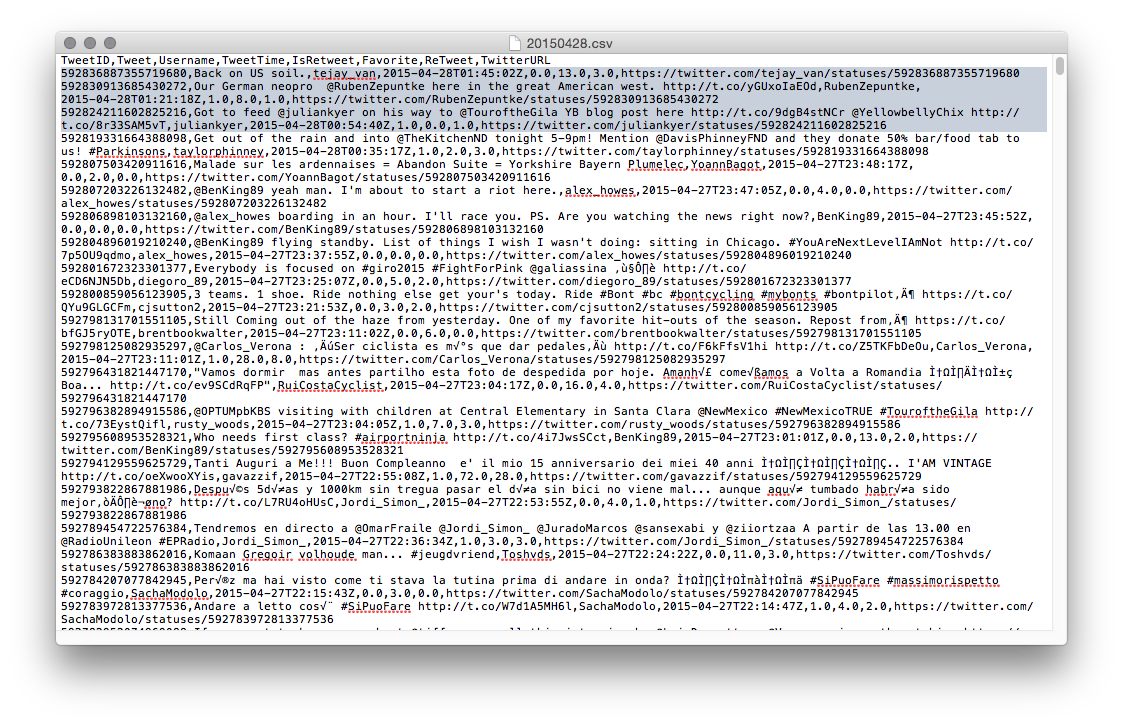
So after completing the first part of this blogpost series, I had put together a bit of infrastructure to easily import data into Neo4j. All the stuff was now in CSV files and ready to go:
So I got out my shiny new Neo4j 2.2.1, and started using Load CSV for getting the data in there. Essentially there were three steps:

  • Importing the metadata about the riders and their twitter handles: importing the metadata
  • Importing the actual tweets
  • Processing the actual tweets
So let's go through this one by one. We will be using the following model to do so:
 

1. Importing the Cycling metadata into Neo4j

I wrote a couple of Cypher statements to import the data from CQ ranking:

//add some metadata //country info load csv with headers from "https://docs.google.com/a/neotechnology.com/spreadsheets/d/1lLD2I_czto1iA1OjCMAZZxnYLAVsngBgjT5c0xuvpJ0/export?format=csv&id=1lLD2I_czto1iA1OjCMAZZxnYLAVsngBgjT5c0xuvpJ0&gid=1390098748" as csv create (c:Country {code: csv.Country, name: csv.FullCountry, cq: toint(csv.CQ), rank: toint(csv.Rank), prevrank: toint(csv.Prev)});   //team info load csv with headers from"https://docs.google.com/a/neotechnology.com/spreadsheets/d/1lLD2I_czto1iA1OjCMAZZxnYLAVsngBgjT5c0xuvpJ0/export?format=csv&id=1lLD2I_czto1iA1OjCMAZZxnYLAVsngBgjT5c0xuvpJ0&gid=1244447866" as csv merge (tc:TeamClass {name: csv.Class}) with csv, tc match (c:Country {code: csv.Country}) merge (tc)<-[:IN_CLASS]-(t:Team {code: trim(csv.Code), name: trim(csv.Name), cq: toint(csv.CQ), rank: toint(csv.Rank), prevrank: toint(csv.Prev)})-[:FROM_COUNTRY]->(c);   //twitter handle info using periodic commit 500load csv with headers from "https://docs.google.com/a/neotechnology.com/spreadsheets/d/1lLD2I_czto1iA1OjCMAZZxnYLAVsngBgjT5c0xuvpJ0/export?format=csv&id=1lLD2I_czto1iA1OjCMAZZxnYLAVsngBgjT5c0xuvpJ0&gid=0" as csv match (c:Country {code: trim(csv.Country)}) merge (h:Handle {name: trim(csv.Handle), realname: trim(csv.Name)})-[:FROM_COUNTRY]->(c);   //rider info load csv with headers from "https://docs.google.com/a/neotechnology.com/spreadsheets/d/1lLD2I_czto1iA1OjCMAZZxnYLAVsngBgjT5c0xuvpJ0/export?format=csv&id=1lLD2I_czto1iA1OjCMAZZxnYLAVsngBgjT5c0xuvpJ0&gid=1885142986" as csv match (h:Handle {realname: trim(csv.Name)}), (t:Team {code: trim(csv.Team)}) set h.Age=toint(csv.Age) set h.CQ=toint(csv.CQ) set h.UCIcode=csv.UCIcodeset h.rank=toint(csv.Rank) set h.prevrank=toint(csv.Prev) create (h)-[:RIDES_FOR_TEAM]->(t);   //add the index on Handle create index on :Handle(name); create index on :Hashtag(name); create index on :Tweet(text); create index on :Handle(nodeRank); create constraint on (h:Handle) assert h.twitterId is unique;

As you can see, I also added some indexes. The entire script is also on Github.

The graph surrounding Tom Boonen now looked like this:


Once I had this, I could start adding the actually twitter info. That's next.

2. Importing the tweet data into Neo4j

As we saw previously, I had one CSV file for every day now. So how to iterate through this? Well, I did it manually, and create a version of this query for every day between April 1st and 30th.

//get the handles from the csv file //this should not do anything - as the handles have already been loaded above using periodic commit 500load csv with headers from "file:<yourpath>/20150401.csv" as csv with csv where csv.Username<>[] merge (h:Handle {name: '@'+lower(csv.Username)});   //connect the tweets to the handles using periodic commit 500load csv with headers from "file:<your path>/20150401.csv" as csv with csv where csv.Username<>[] merge (h:Handle {name: '@'+lower(csv.Username)}) merge (t:Tweet {text: lower(csv.Tweet), id: toint(csv.TweetID), time: csv.TweetTime, isretweet: toint(csv.IsReTweet), favorite: toint(csv.Favorite), retweet: toint(csv.ReTweet), url: csv.`Twitter URL`})<-[:TWEETS]-(h);

This file is also on Github, of course. I ran this query 30 times, replacing 20150401 with 20150402 etc etc... The result looked like this:
But obviously this is incomplete: we only have the tweets issued by specific riders now - and we would really like to know who and what they mentioned - in other words extract the handles and hashtags from the tweets. Let\s do that!

3. Processing the tweets: Extract the handles and the hashtags

I created two queries to do this - they are also on Github:
//extract handles from tweet text and connect tweets to handles match (t:Tweet) WITH t,split(t.text," ") as words UNWIND words as handles with t,handles where left(handles,1)="@"with t, handles merge (h:Handle {name: lower(handles)}) merge (h)-[:MENTIONED_IN]->(t);   //extract hashtags from tweet text and connect tweets to hashtags match (t:Tweet) WITH t,split(t.text," ") as words UNWIND words as hashtags with t,hashtags where left(hashtags,1)="#"with t, hashtags merge (h:Hashtag {name: upper(hashtags)}) merge (h)-[:MENTIONED_IN]->(t);
And that's when we start to see the twitter network unfold: multiple riders tweeting and mentioning eachother:


That's about it for this part 2. In the next section we will go into how we can enrich this dataset with more data about the connectedness between riders. Who is following who?

I hope you have liked this series so far. As always, feedback very welcome.

Cheers

Rik

Tuesday, 12 May 2015

Cycling Tweets Part 1: Who's who on Twitter

I have been a Cycling fan for a long time. Got into it at University a long time ago through some crazy friends that were already into it. And I have been on the bike ever since. Whether it's just for some grocery shopping and/or bar hopping in Antwerp, or for a longer holiday trip - or just for watching the pro riders in  CycloCross or Road racing - I am game for all of it. I even got my boys really excited about - watching legendary races like the Tour of Flanders or Paris-Roubaix together religiously.

So last March, I was thinking of yet another crazy Neo4j-experiment to do, and I thought about doing that on some cycling topics. After all, April is a "Holy Month" for cycling enthousiasts - many of the legendary "classic races" are happening during that month. So that's what I did. I will be detailing this over the next couple of blogposts - but suffice to say that I got into a bit of a project here, a journey that I gladly want to share with you.

So here it goes. This is part 1 of (what I think will be) 5 blogposts around Neo4j, graph databases, Twitter and Cycling. Hoping you will enjoy it.

Starting with the riders

The obvious idea I had was to try and do some work with some social networking data for the top riders in the pro cycling peloton. I follow some of these guys myself on my Twitter feed, but how would I be able to get to all the interesting ones like Tom Boonen, Fabian Cancellara, and others. I googled around a bit and found this site: CQ Ranking. In their own words: they are a ranking of Pro cycling riders that try to rank riders based on the past 12 performance - a bit like the UCI ranking of cyclists. And they provide some really cool data: here's an example of a sheet that you can download from their website.

One of the most interesting data elements that I found on the CQ website was the list of Twittering riders. This was almost exactly what I was looking for for my experiment, a long list of all the riders, their teams, their countries... and their twitter handles. Obviously there were going to be some mistakes/problems in this list, but still - it looked pretty sweet. So there I went, downloading everything and putting it all into a google spreadsheet for some data cleanup so that I could prepare it for an upload into Neo4j.

The only real thing that I had to do was to match the CQ ranking sheet with the with twittering riders. That was easy enough once I had both data sets different tabs of the google sheet: a simple VLOOKUP was all it took:
And then we got this sheet:
Interesting. Now I have a list of very interesting twitter accounts - what to do with them. This is when the first part of my experiment really started to materialise, and when I decided that I would love to know what all these interesting online characters would be up to in a Holy (!) month like this one. I would love to know what they were tweeting about, who they were mentioning, how they would be grouped together etc... So I needed to get to that data... 

Getting to the Twitter data

This turned out to be a bit more difficult than I thought it would be. Sure, Twitter gives you this API access to read from their vast datasets, but frankly, for a newbie like me these "rate limiting" rules are pretty confusing and intransparant. And plus - I don't really know how to code :) - so that really limited my options. So I tried a few things and then decided that the easiest way to get to all of these "April tweets" would be to create a new twitter account  (CycleF0ll0w) and then follow all of the accounts that I wanted to follow (from the spreadsheet). So that's what I did: a ghost twitter ID appeared: all it does is follow people - so that I have access to the timeline that contains the information I want.

In order to easily create the list of people that "I" followed, I used a tool called Tweepi: it allows for bulk creation of "follow" links really easily. I decided to go with the top 500 (as per their CQ ranking) riders - that should be more than interesting enough.

Exporting and Cleaning the timeline

So now I have a timeline. How do I get that to be extracted so that I can work with it and get it ready to be imported into Neo4j? Again, I investigated multiple options, but ended up going for a paid service: Exporttweet. On a daily basis, this service automatically created an Excel spreadsheet containing all the tweets appearing on my CycleF0ll0w timeline.
The output was really simple: an Excel file a day, keeps the doctor away!
Now all there was left to do was to clean these sheets up a bit. I used my tried and tested Open Refine install to do that:
It was mostly taking out special characters, renaming column names, and removing duplicates, and I ended up with a very simple set of Replay Refine operations based on the saved json file:
That was it. Now I had everything ready to get started:
  • a google doc with a bunch of metadata about riders (names, teams, rankings, twitter handles)
  • a timeline with all the tweets of these riders, and a way to export that into daily XLS files
  • an OpenRefine process to create CSV files out of these tweets on a daily basis. 
In the next blog post I will go and get started with this - and start having some fun with the data.

Hope you enjoyed this so far - already looking forward to part 2. As always, feedback welcome.

Cheers

Rik